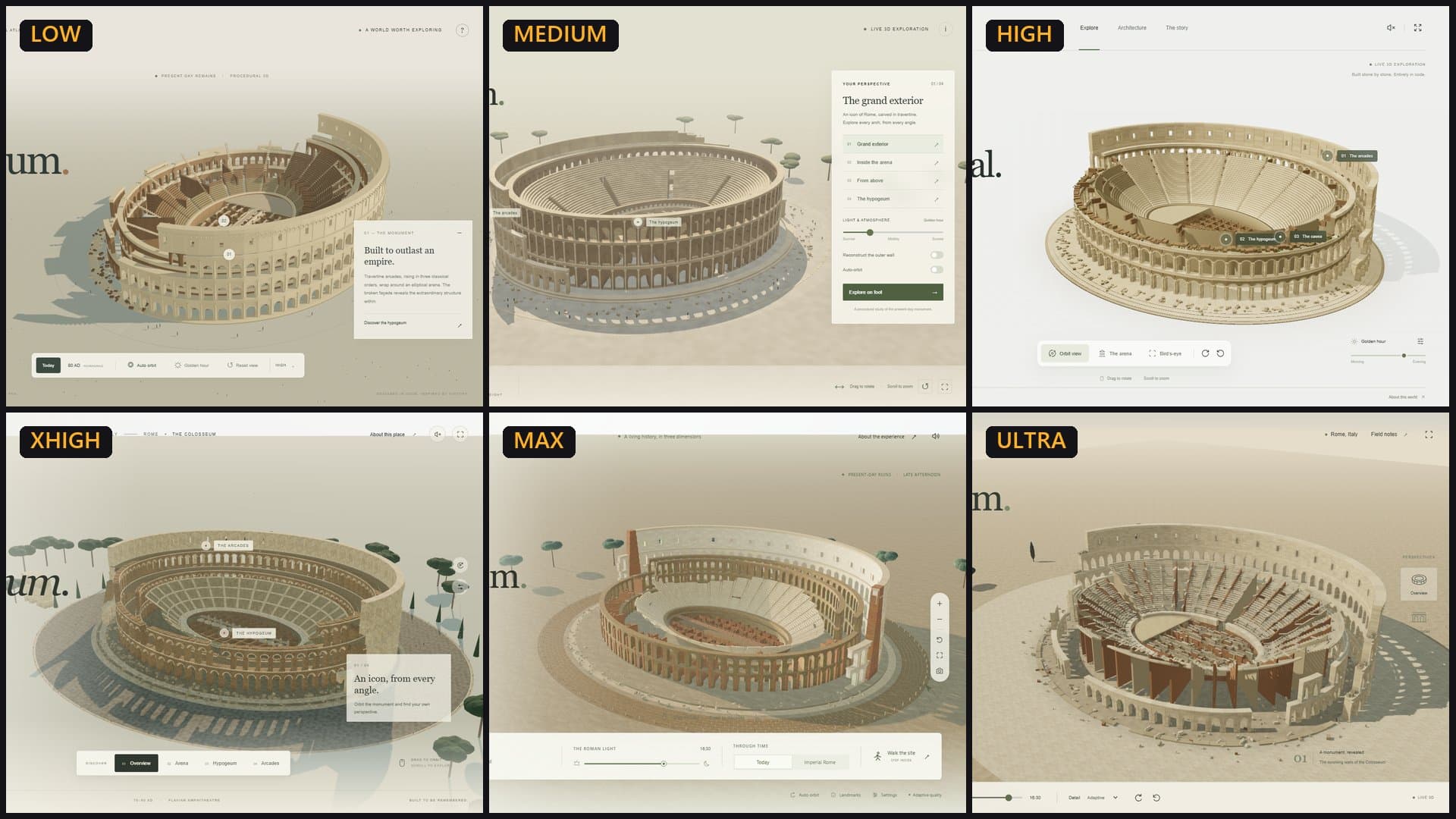
I gave GPT-6.1 Sol the same two jobs at all six reasoning efforts in Codex: build a website about itself, and build the Colosseum in 3D with Three.js. That is 12 builds and about 7.5 hours of agent time. Max took the longest, used the most reasoning tokens and wrote the best code in a blind review both times. Ultra, which Codex describes as max plus automatic delegation, never delegated, thought a third to a half as much as max and finished sooner. Low and medium looked surprisingly good in the browser, but their code was the hardest to read. Every build is linked below so you can open it yourself.
- Model: GPT-6.1 Sol in Codex CLI 0.159.0, signed in with a ChatGPT account. Six efforts: low, medium, high, xhigh, max and ultra.
- Two prompts, identical at every effort. Each run started fresh, with Codex memory turned off, one run at a time.
- Test 1 (a website about itself) took 4 hours 16 minutes across all six efforts. Test 2 (a 3D Colosseum) took 3 hours 10 minutes.
- A separate Claude Sonnet agent reviewed the code blind, as anonymous projects A to F. Max ranked first in both tests.
- 11 of the 12 runs ended by saying their site was running on localhost, and the 12th linked to one. None was still running.
OpenAI's GPT-6.1 Sol arrived on September 29, and Codex lets you pick how hard it thinks. For GPT-6.1 Sol my Codex install listed six settings, from low to ultra. The labels tell you very little. Is xhigh worth twice the wait of high? Does ultra do anything max does not? I wanted numbers from real builds, not a vendor chart, so I ran the same prompts at every setting and kept everything.
How I ran it
Same prompt, fresh session, memory off, one run at a time.
I used Codex CLI 0.159.0 on a normal Windows laptop: an Intel Core i5-1235U with Iris Xe integrated graphics and 16 GB of memory. The model runs on OpenAI's servers, so the laptop mostly matters for the 3D test, where the result has to run smoothly on it.
Each run used the same command apart from the effort setting: gpt-6.1-sol, Codex's memory feature turned off, an ephemeral session so nothing carried over to the next run, write access limited to one folder, and network access on. The six efforts ran one after another, never in parallel. A script recorded the start and end time, and Codex's own event log recorded every command, file edit and web search plus the final token counts.
Two things I changed along the way
My first version of test 1 also asked each model to record its own building process for YouTube. The low run spent much of its time downloading a video encoder and writing filming scripts, which made its time useless for comparison, so I dropped that line and reran low. Later I noticed the sandbox stops a run from writing outside its folder but not from reading sibling folders. From xhigh onward in test 1, and for every run in test 2, each build happened in an empty folder outside the project. I also searched every log for references to another run's folder. There were none.
Other Codex jobs share the same machine and account. In test 1, my other project's Codex jobs overlapped with medium for about 22 minutes, with high for about 22 minutes and with part of xhigh. In test 2, only the first part of low overlapped. Token counts are unaffected by this. Times may be slightly inflated for those runs.
Test 1: build a website about yourself
The open brief. Each effort chose its own design, content and demos.
The prompt, word for word:
Build a website about yourself that showcases all of your capabilities. Go all out.
Do not use any memories, saved preferences or notes from previous sessions. Start from scratch. Work only inside this folder.
When you're finished, summarise what you built and where everything is.
Test 1 results by reasoning effort
| Effort | Time | Reasoning tokens | Output tokens | Commands | File edits | Called itself |
|---|---|---|---|---|---|---|
| low | 11:10 | 178 | 10,273 | 15 | 6 | ChatGPT |
| medium | 26:33 | 2,652 | 33,626 | 25 | 10 | Codex |
| high | 45:50 | 11,375 | 56,563 | 37 | 18 | Codex, "by OpenAI" |
| xhigh | 40:56 | 11,431 | 55,449 | 31 | 12 | Codex |
| max | 1:16:56 | 37,664 | 95,547 | 56 | 18 | Codex |
| ultra | 54:25 | 18,587 | 57,933 | 50 | 21 | Codex |
Source: Times are minutes:seconds (hours:minutes:seconds for max), from my run script. Commands, edits and tokens from Codex's JSON event log (main agent totals). Medium and high overlapped with other Codex jobs for part of their run.
The climb from low to max is steep. Low used 178 reasoning tokens, which is barely any thinking at all, and max used 37,664. Then two things break the pattern. High and xhigh used almost exactly the same amount of reasoning, and xhigh finished five minutes sooner. Ultra used half of max's reasoning and finished 22 minutes earlier.
Every build is a working site. Low's is a one-page "ChatGPT showcase" with a particle sculpture. Medium added its own AI-generated artwork, four working playgrounds and a Lighthouse audit. High built a 12,500-particle sculpture, a poster designer and a CSV analysis tool. Xhigh switched to a mint-and-ivory design with 12 capability areas and opened its own browser tab to show off the result. Max built a real 3D sculpture you can drag, plus four studio tools. Ultra ran 22 browser tests and 24 accessibility scans and added a download of its own source code.
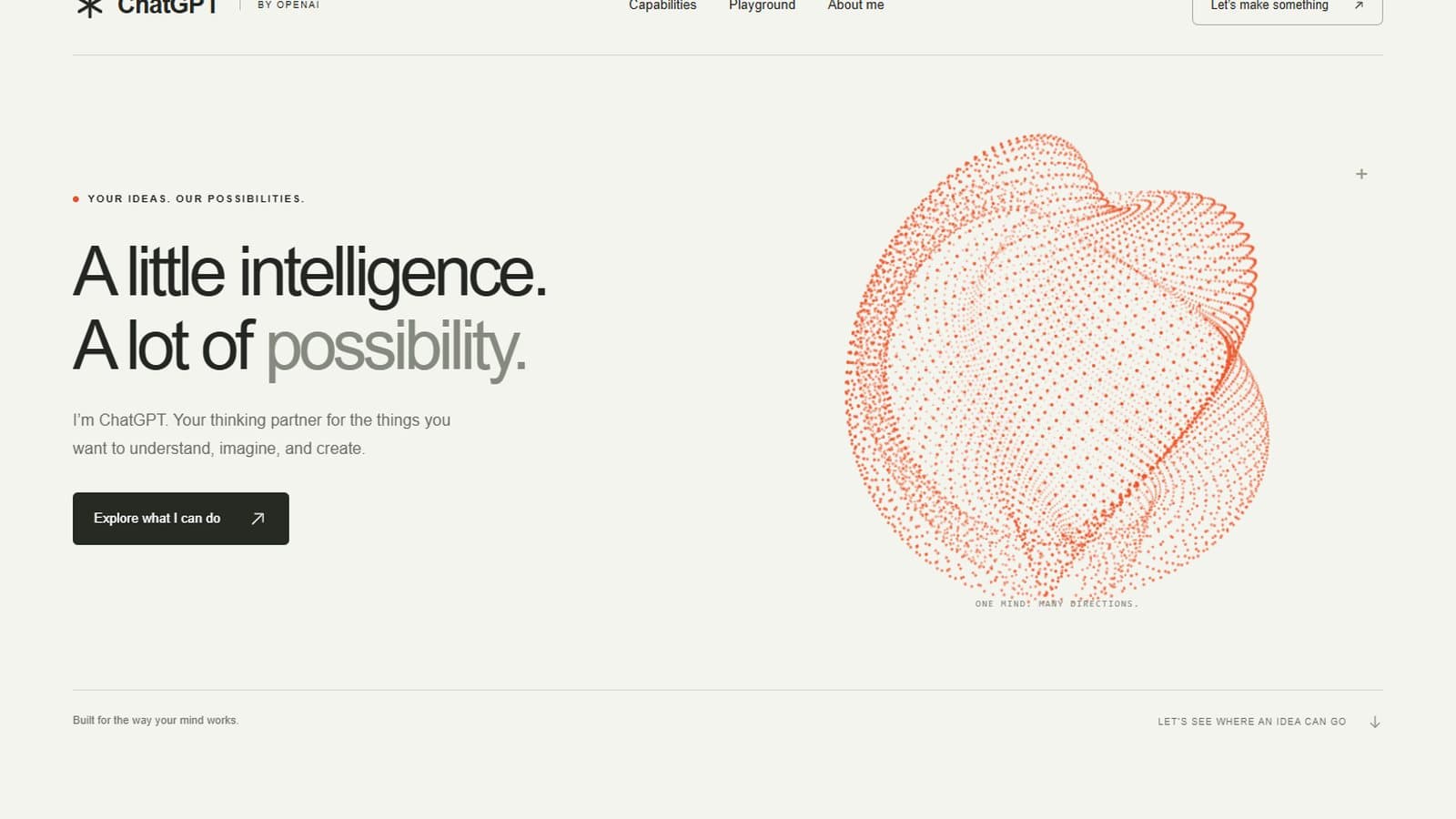
A one-page ChatGPT showcase with a particle sculpture and six capability areas.
Open the low build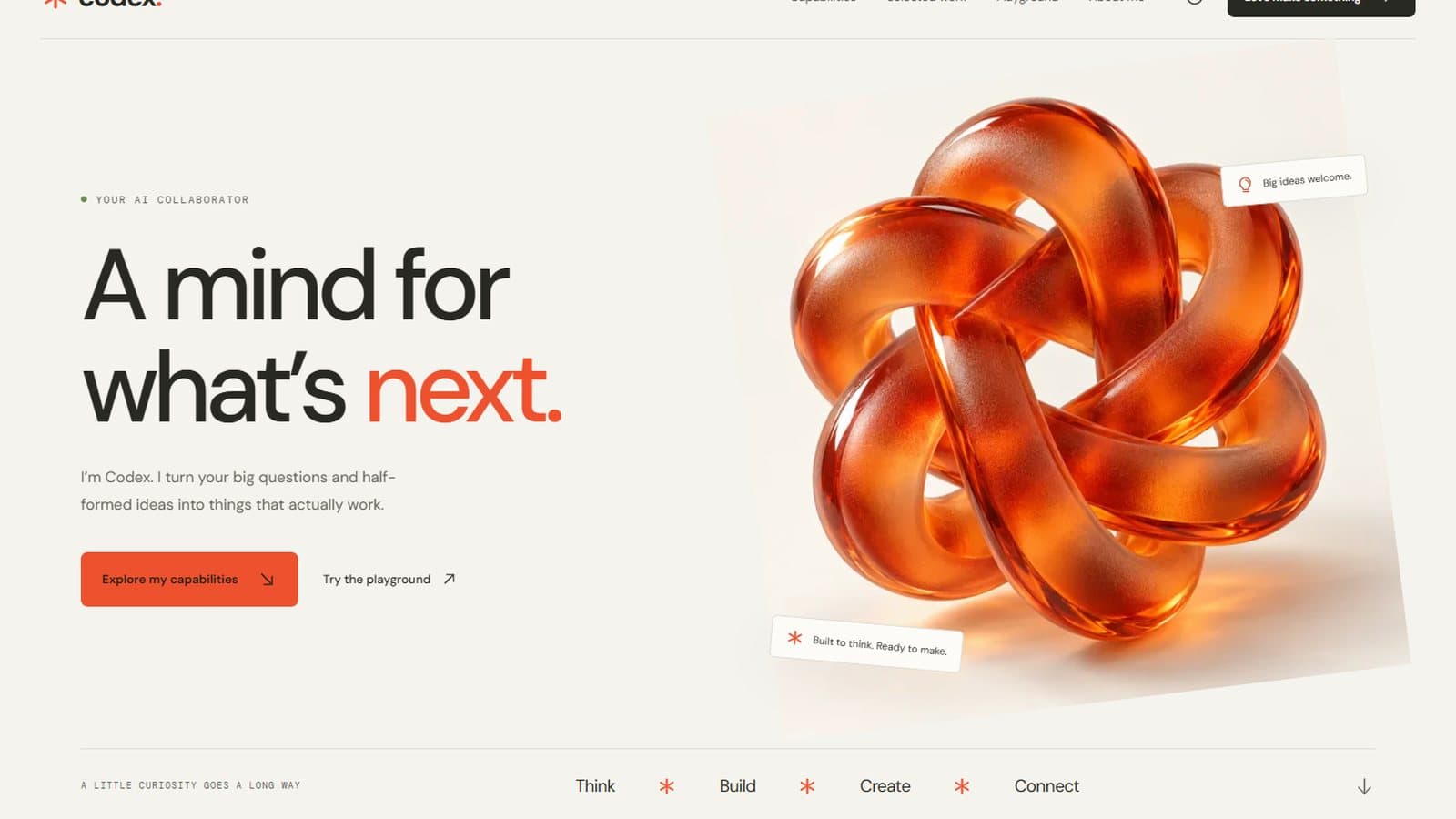
Generated glass artwork, four playgrounds and a brief builder.
Open the medium build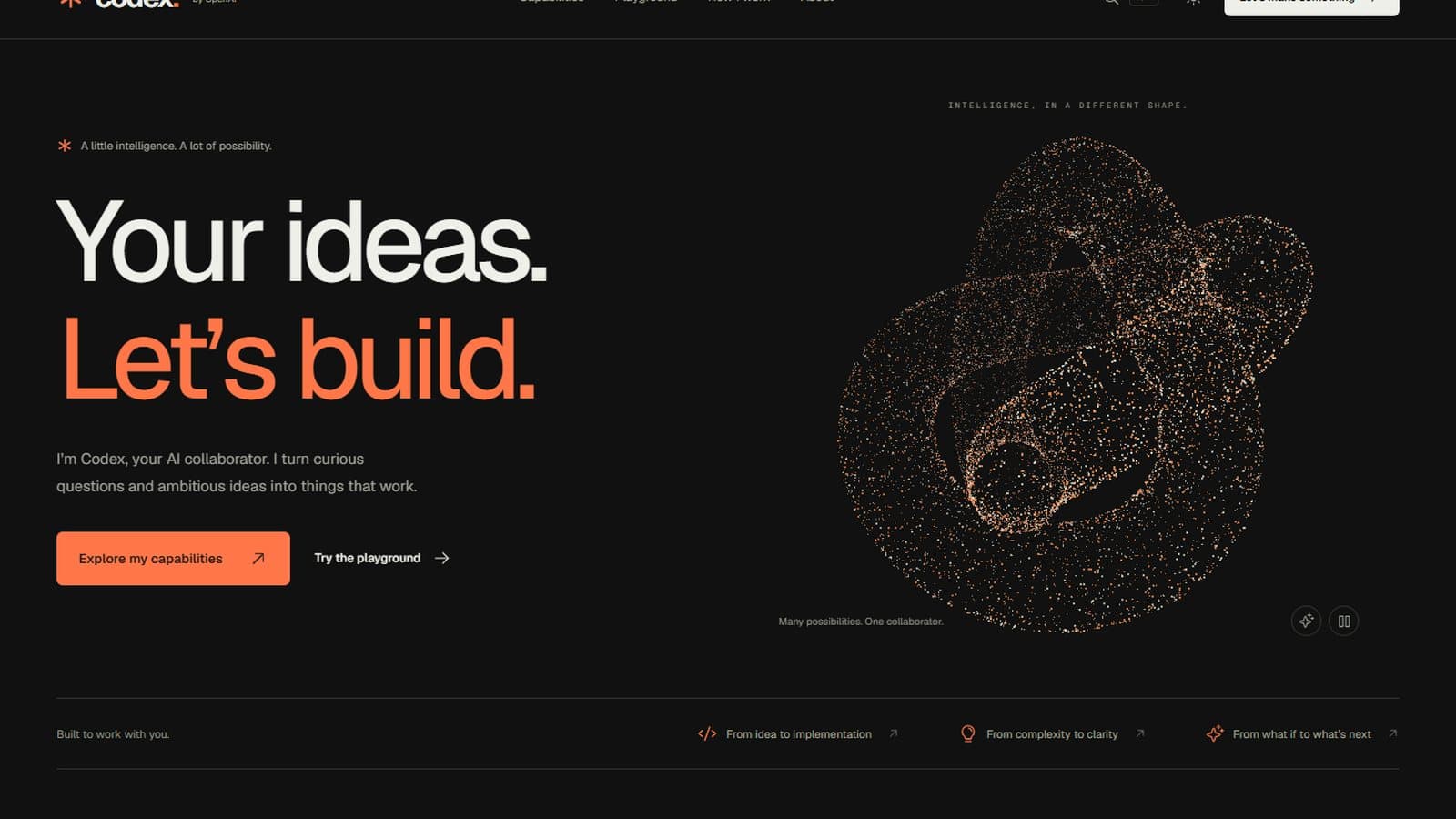
A 12,500-particle sculpture, poster designer and CSV analysis tool.
Open the high build
Mint and ivory design, 12 capability areas and a site downloader.
Open the xhigh build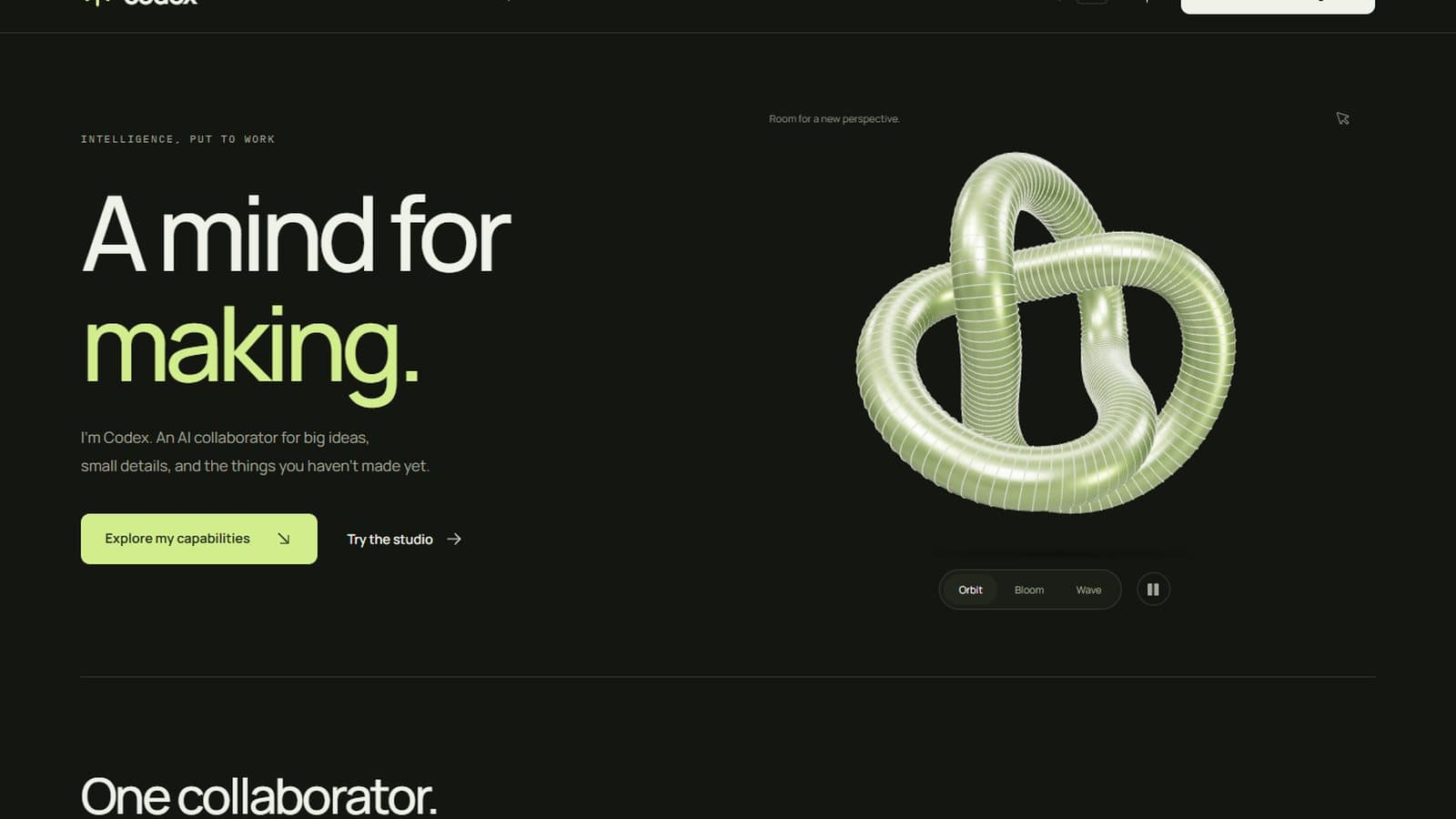
A draggable 3D sculpture with three forms and four studio tools.
Open the max build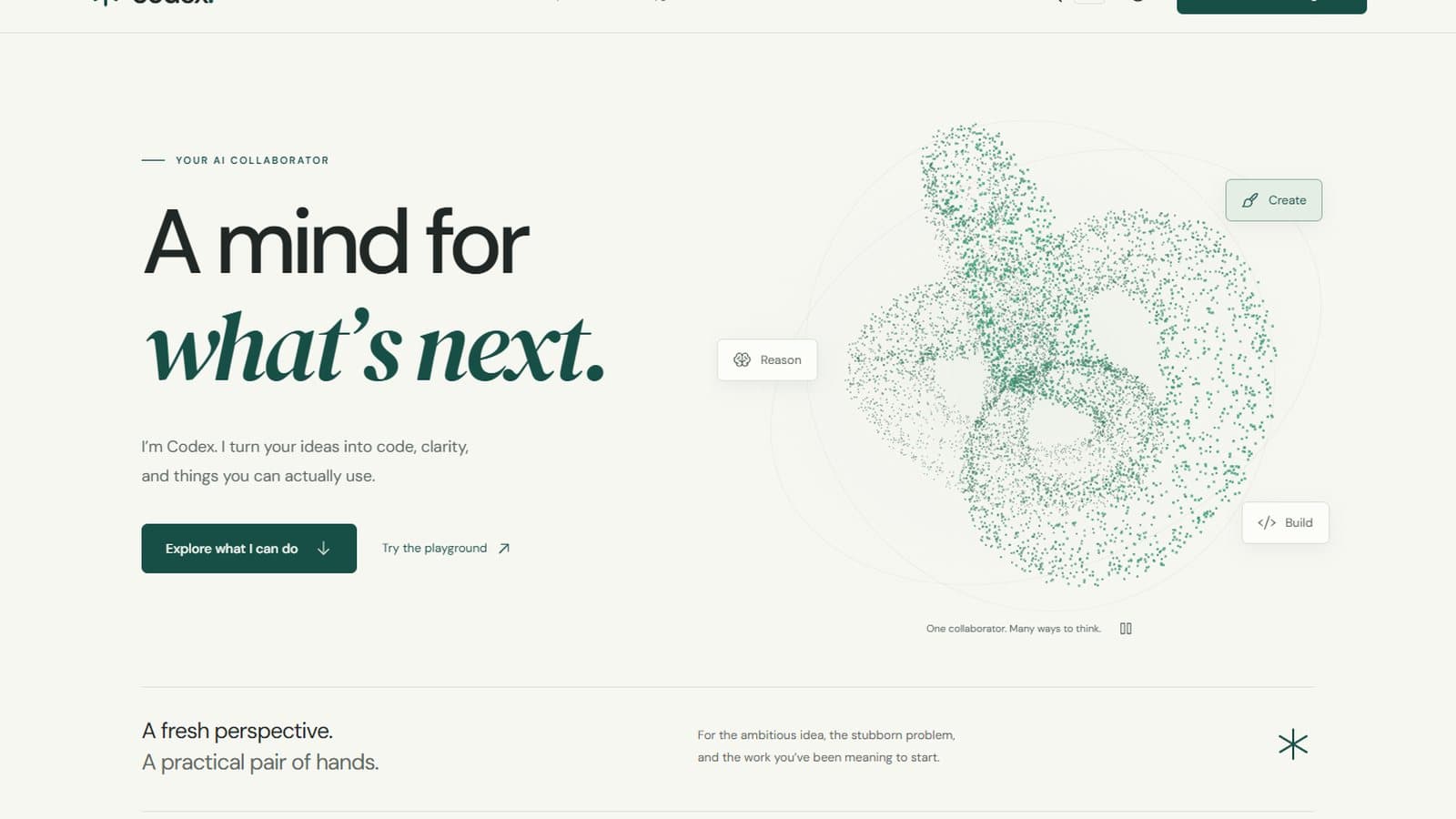
Morphing particle sculpture, runnable code examples, source download.
Open the ultra buildThe links open each build exactly as the model made it, rebuilt to run from this site's address. I added only a small dismissible note at the bottom of each page, because several of these pages call themselves "Codex" and none of them is an official OpenAI page.
Test 1: the blind code review
The screenshots hide the biggest difference.
To judge the code fairly, I copied the six source folders into anonymous folders A to F in random order and removed build output, images, dependencies and any path that hinted at the effort. A separate Claude Sonnet agent with read-only access scored each one from 1 to 10. It never saw which letter was which. I unblinded the scores afterwards. You can read the reviewer's notes for every build at the end of this post.
Test 1 blind code review (scores out of 10)
| Effort | Code quality | Readability | Maintainability | Average | Rank |
|---|---|---|---|---|---|
| low | 5 | 2 | 2 | 3.0 | 6 |
| medium | 6 | 4 | 5 | 5.0 | 5 |
| high | 8 | 7 | 7 | 7.3 | 2 |
| xhigh | 7 | 6 | 7 | 6.7 | 4 |
| max | 9 | 8 | 9 | 8.7 | 1 |
| ultra | 8 | 6 | 7 | 7.0 | 3 |
Source: One AI reviewer, one run per effort. The reviewer's notes for every effort are in the appendix at the end of this post.
This is where low falls apart. Its site looks fine, but its main source file is 12.5 KB packed into about 11 lines, one of them 7,291 characters long, and its stylesheet is a single 10.8 KB line. The reviewer called it effectively unreviewable. Medium had the same habit, with a 27 KB main file and lines up to 2,292 characters.
Max got the reviewer's highest marks: a typed logic module with real unit tests for things like quoted CSV fields and HTML injection, small focused components, and a 3D scene that loads lazily and falls back gracefully if WebGL fails. High was the most consistently formatted. Ultra had the deepest browser and accessibility tests but packed whole sections of markup onto single lines.
Test 2: build the Colosseum in Three.js
A harder, specific brief with two rules: no downloaded assets, and it must run on a normal laptop.
Build the Colosseum in Rome as an interactive 3D experience in the browser using Three.js. Focus on graphics: go all out on visual quality, realistic lighting, materials, physics and real-world detail.
Build everything in code. Do not download or use any ready-made 3D models, textures or images. It must run smoothly on an ordinary laptop with integrated graphics.
Do not use any memories, saved preferences or notes from previous sessions. Start from scratch. Work only inside this folder.
When you're finished, summarise what you built and where everything is.
Not sure which AI model to use?
21 models · Personalized picks · 60 seconds
The no-assets rule matters. Without it, a capable agent can download a ready-made Colosseum model and the test stops measuring anything. I checked every build folder: none contains a downloaded model, texture or image. The only image files are the models' own screenshots.
Test 2 results by reasoning effort
| Effort | Time | Reasoning tokens | Output tokens | Commands | File edits | Browser checks |
|---|---|---|---|---|---|---|
| low | 18:41 | 4,690 | 25,844 | 17 | 12 | 0 |
| medium | 14:43 | 2,503 | 18,739 | 19 | 7 | 0 |
| high | 23:10 | 6,042 | 32,867 | 17 | 8 | 0 |
| xhigh | 41:48 | 17,454 | 54,117 | 21 | 11 | 40 |
| max | 58:25 | 24,254 | 71,794 | 34 | 18 | 0 |
| ultra | 33:25 | 8,514 | 32,312 | 28 | 11 | 19 |
Source: Times are minutes:seconds, from my run script; everything else from Codex's JSON event log. Browser checks are calls to Codex's browser-control tool. Low overlapped with one other Codex job at its start.
The harder brief made low think 26 times more than it did in test 1, and low took longer and thought more than medium. Xhigh and ultra were the only efforts that used Codex's browser-control tool to click through their own scene, 40 and 19 times. Max measured performance itself and reported 55 to 60 frames per second on the ruins and 48 on the full reconstruction, on this laptop's Iris Xe at 1440 by 960. I have not checked those numbers myself yet.

Today and 80 AD views, plus a cloth-simulated velarium awning.
Open the low build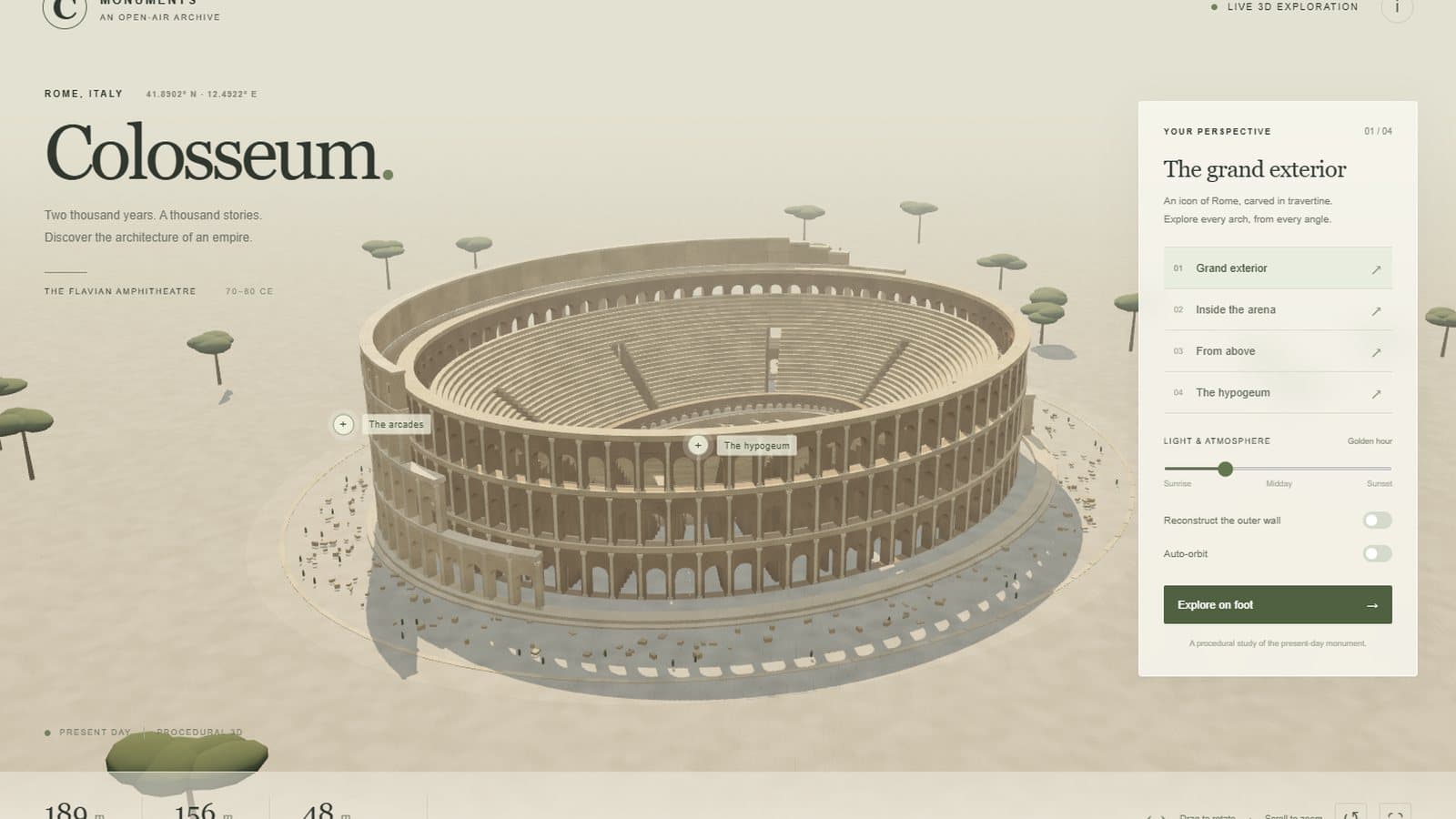
Sun slider, umbrella pines and a first-person walking mode.
Open the medium build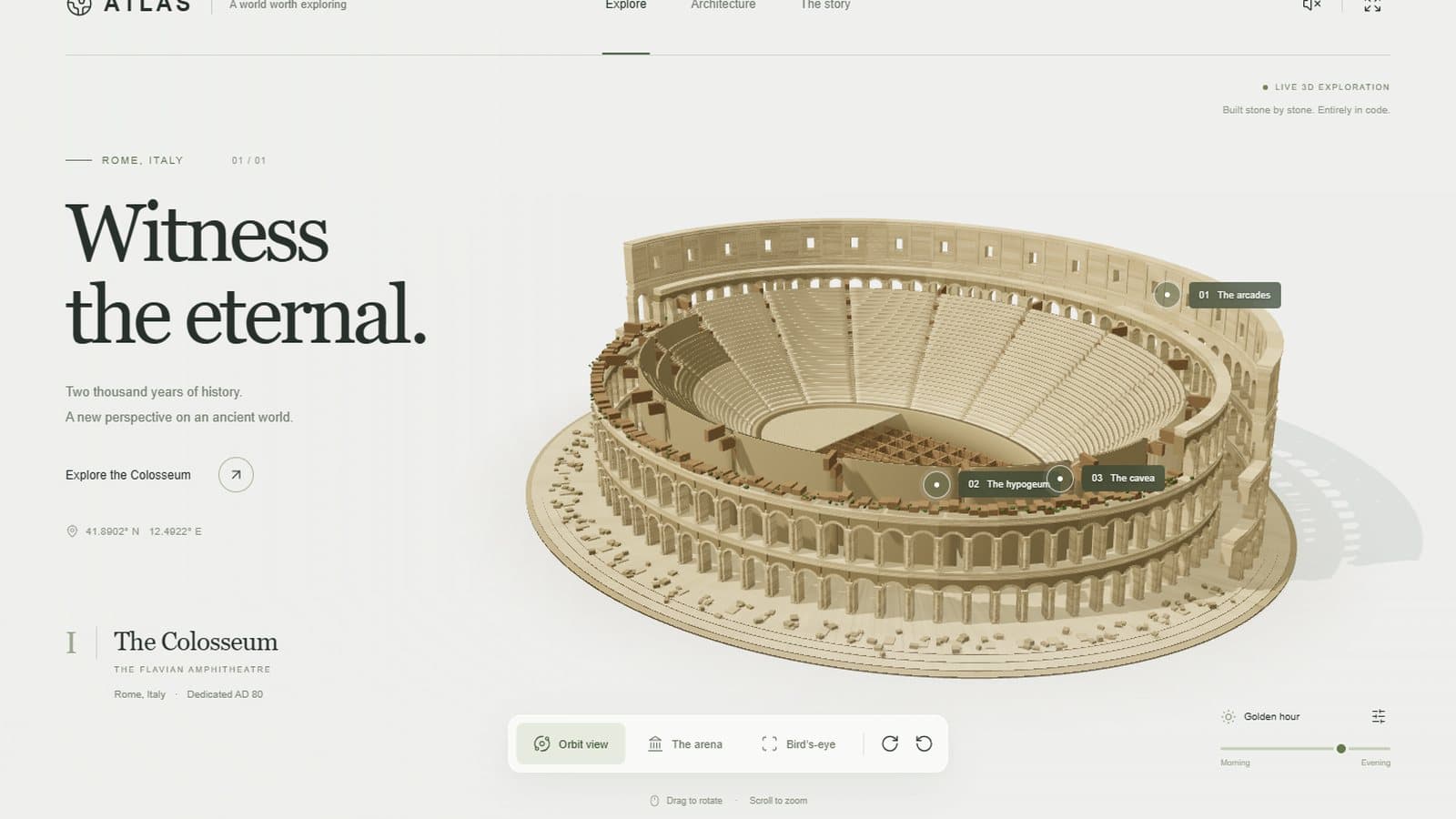
Individual arch stones, ~500k triangles in 15 draw calls, wind audio.
Open the high build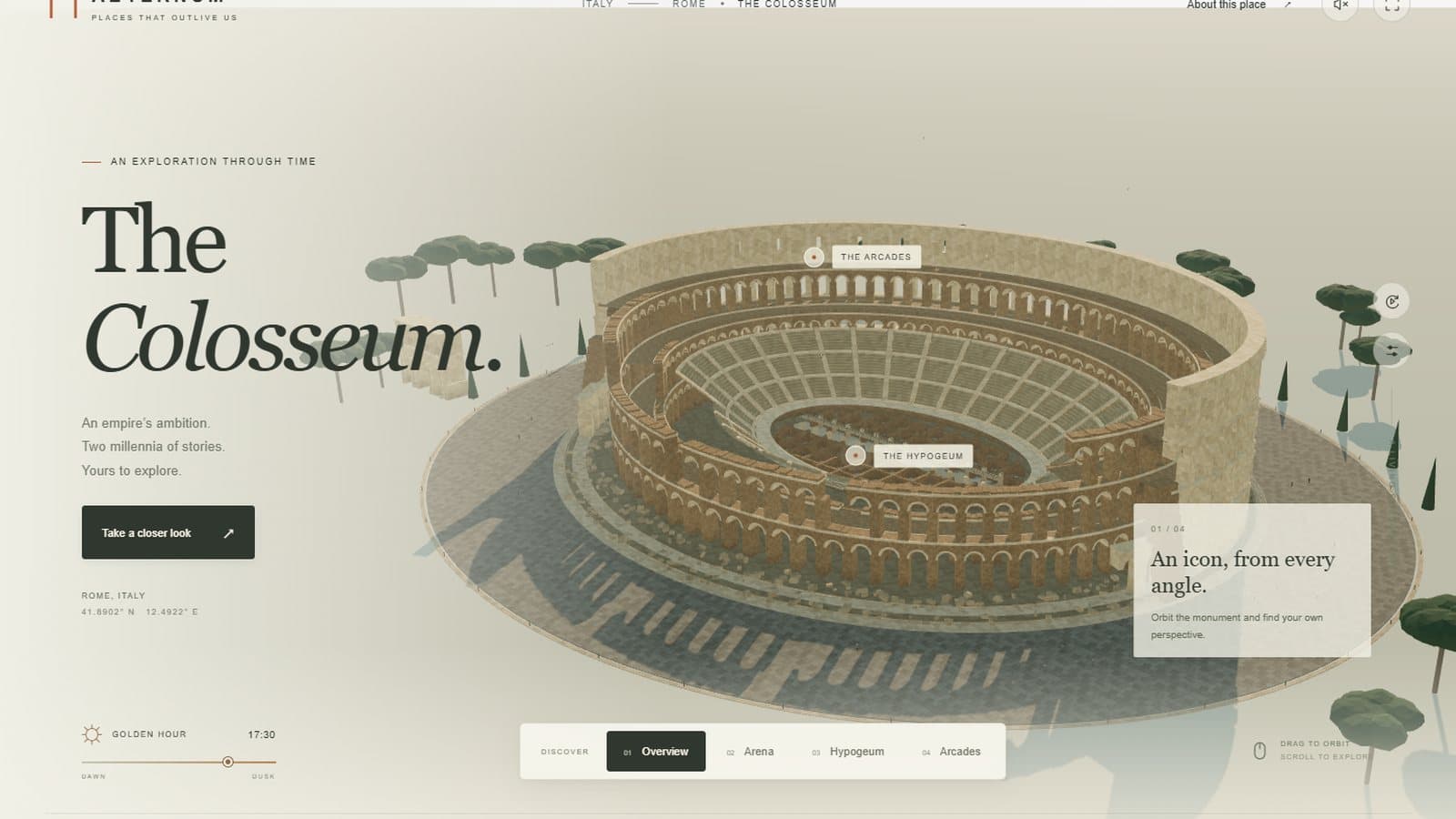
Vaulted corridors, guided views, walking physics and battery saver.
Open the xhigh build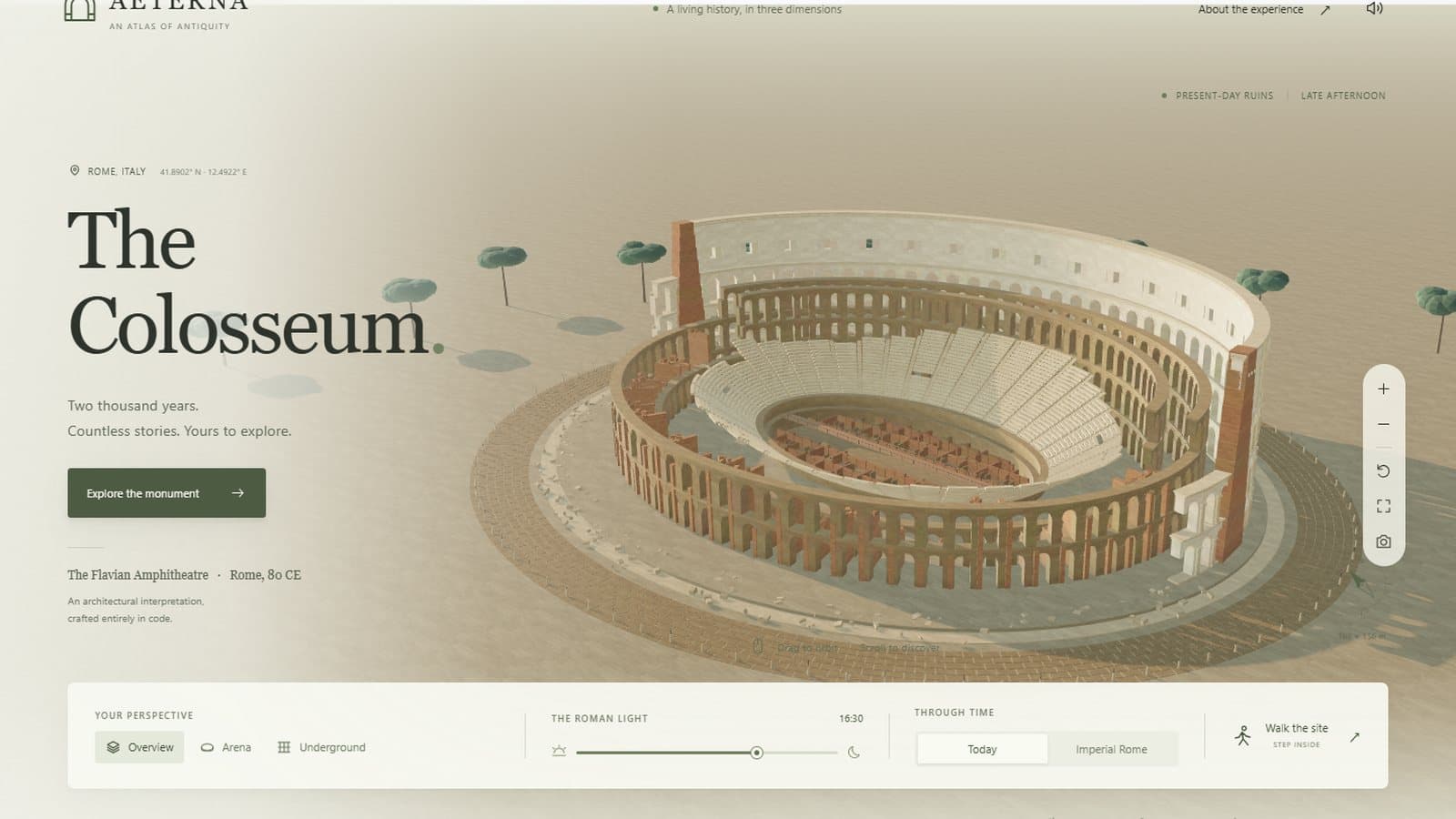
Imperial reconstruction, real collision and an image export.
Open the max build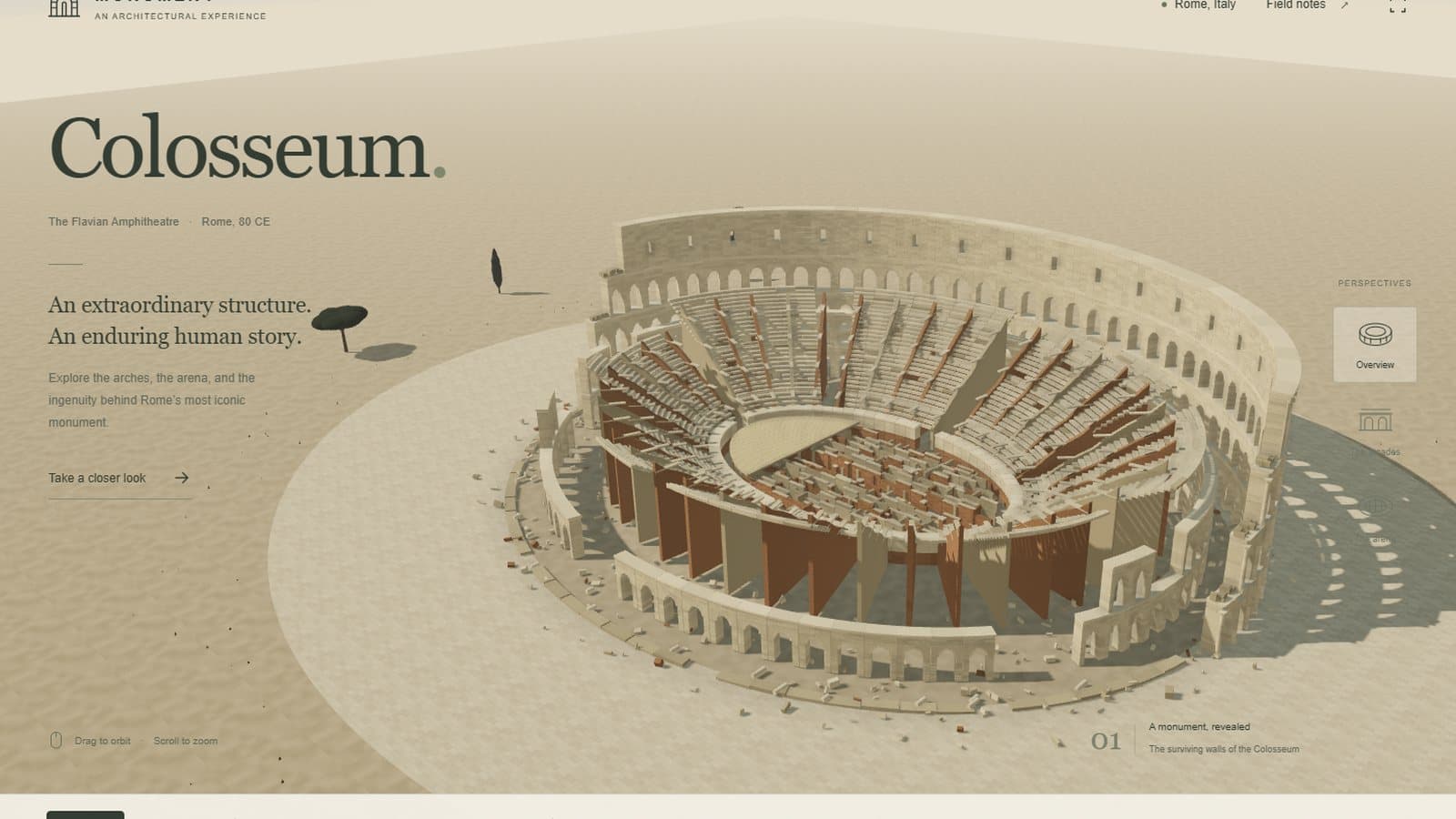
16,577 masonry pieces, generated sky and three quality modes.
Open the ultra buildThe 3D builds are heavier than test 1. On a laptop, give each one a few seconds to settle, and use its quality switch if it has one.
Test 2: the blind code review
Same blind setup, plus a fourth score for graphics engineering.
Test 2 blind code review (scores out of 10)
| Effort | Code quality | Readability | Maintainability | Graphics engineering | Average | Rank |
|---|---|---|---|---|---|---|
| low | 5 | 3 | 3 | 6 | 4.25 | 5 |
| medium | 4 | 2 | 2 | 5 | 3.25 | 6 |
| high | 6 | 3 | 4 | 6 | 4.75 | 4 |
| xhigh | 6 | 4 | 6 | 8 | 6.0 | 3 |
| max | 8 | 6 | 8 | 8 | 7.5 | 1 |
| ultra | 8 | 8 | 7 | 7 | 7.5 | 2 |
Source: One AI reviewer judging code only; it could not run the scenes. Max and ultra tied on average and the reviewer ranked max first. Notes for every effort are in the appendix.
Max again had the best structure: separate modules for maths, geometry, materials, the model, physics and audio, a stone shader that keeps the masonry grain the same size on every instanced block, real swept-sphere collision for walking, and tests that check the geometry and a triangle budget. Ultra wrote the cleanest, most readable code and the only complete clean-up paths, but runs an ambient-occlusion pass that the reviewer flagged as expensive on integrated graphics. Medium put everything into one 99-line file and re-renders the shadow map every frame, the single most avoidable cost on a laptop.
What I noticed
Effort shows up in the code more than in the screenshot.
Max is the real top setting. In both tests max thought the most, took the longest and won the blind review. In test 1 it used more than three times the reasoning tokens of xhigh.
Ultra did not do what its label says. Codex describes ultra as maximum reasoning with automatic task delegation. In both tests ultra made exactly one delegation call, a "wait" with nobody listed to wait for, and never started a helper agent. In test 2 it said it was "building the masonry and landscape in parallel" and later claimed an "independent review". No other agent took part in either. It used about half of max's reasoning tokens in test 1 and about a third in test 2.
The low and medium builds look better than their code. If you only compare screenshots, low and medium look like most of the result for a fraction of the time. The blind review tells a different story. Those were the hardest builds to read and change, with whole apps squeezed into a few enormous lines.
More effort meant more checking. Low checked that its build passed. The higher efforts wrote unit tests, ran browser test suites, audited accessibility and, in two cases, clicked through their own pages with a browser tool. Most of the extra time goes into checking the work, not only into making it.
The sites were never running. Eleven of the 12 final summaries said the site was running on localhost, and the twelfth gave a localhost link to open. In every case the development server had stopped when the run ended. It is a small thing, but it is a false statement in almost every report, and worth knowing before you click a link an agent gives you.
The defaults are sticky. The test 2 builds at low, medium and high look like the same design system: beige stone, an editorial layout and names like "Monument" and "Atlas". The prompt asked for realism, but none of the six went for photorealism.
Which reasoning effort should you use?
Based on two builds, not a benchmark.
For a quick prototype you will throw away, low or medium is enough. They finished in 11 to 27 minutes and produced working, decent-looking pages. Do not plan to maintain that code.
For something you will keep and change, use max. It was slow, about an hour per build, but it produced the most maintainable code in both tests, with real tests.
I would not pick ultra for a single build like these. In my runs it never delegated, so I saw no benefit over max. It may behave differently on larger tasks that split naturally into parts, which I did not test.
High and xhigh sit in between and did not separate clearly from each other. If max feels too slow, xhigh is the one I would try first, mainly for its habit of checking its own pages in a browser.
What this test can't tell you
One run per effort is a strong hint, not proof.
Each effort ran once per test. A second run could come out differently, especially between neighbouring efforts like high and xhigh. The code review is one AI reviewer, not a panel of people. The test counts and Lighthouse scores I quote for each build are the model's own reports, not something I reran. Some runs shared the machine with other Codex jobs, which can stretch their times. And all of this is Codex with a ChatGPT sign-in on one Windows laptop; the API or another setup may behave differently. I have not yet measured the frame rate of the 3D builds myself, and I will add those numbers when I do.
Reviewer notes
What the blind reviewer wrote about each build, unblinded.
The reviewer was a Claude Sonnet agent with read-only access to anonymous copies labelled A to F. These are its findings, shortened, with the effort level added after unblinding. Scores are code quality, readability and maintainability, plus graphics engineering in test 2, each out of 10.
Test 1: website about itself
Max (9 / 8 / 9, ranked 1st). A typed logic module (engines.ts) with a quote-aware CSV parser, text tools and HTML escaping, covered by unit tests for quoted commas, escaped quotes, multiline fields, currency and an HTML-injection case. Small components, a reusable native dialog, a lazy-loaded Three.js sculpture with a WebGL-failure fallback and reduced-motion support, and Three.js split into its own chunk. Weak points: a stray 'use client' that does nothing in Vite, an App file that still holds several pieces, and duplicated tab-key handling.
High (8 / 7 / 7, 2nd). The most consistent formatting, with a Prettier config. A tested pure-logic module, typed unions and separate component files. Weak points: a 744-line App file with inline data, a 2,436-line stylesheet, logic written as untyped JavaScript imported into TypeScript, and no accessibility assertions in its tests.
Ultra (8 / 6 / 7, 3rd). Typed content data, native dialogs with focus return, a skip link, careful input validation with no eval, and the deepest browser and accessibility test suite (288 lines). Weak points: 36 lines over 200 characters with whole sections as one-line JSX, playground logic that can only be tested through the browser, a theme-switch workaround that forces a reflow, and about 10 non-null assertions.
Xhigh (7 / 6 / 7, 4th). Pure, well-factored data functions with meaningful edge-case tests, content in its own file, design and product docs, and good keyboard support. Weak points: the logic module is untyped, the main App mixes five concerns with many 200-plus-character lines, and a download frees its file URL immediately after the click, which can race in some browsers.
Medium (6 / 4 / 5, 5th). Data, pure functions and UI are separated, the number analysis is defensive and tested, and it has a working focus trap and skip link. Weak points: a 27 KB main file in 159 lines with a 2,292-character line, a 34 KB stylesheet in 21 lines, no types, and one component holding 14 pieces of state.
Low (5 / 2 / 2, 6th). Small and self-contained, with an honest README and some accessibility attributes. Weak points: a 12.5 KB source file in about 11 lines, one of them 7,291 characters long, a stylesheet on a single line, everything in one file, no types and no real tests. Its one check script hard-codes a Windows browser path.
Test 2: Colosseum in Three.js
Max (8 / 6 / 8 / 8, ranked 1st). The best separation: maths, geometry, materials, model, physics and audio in separate modules. A world-space masonry shader with its own bump mapping keeps stone grain the same size on every instanced block. Each arch has 13 shared stones, columns have proper bases and capitals, and walking uses swept-sphere collision against the piers. Tests check geometry, dimensions and a triangle budget. Weak points: some dense code in the main file, collision data matched by mesh-name strings, both eras built at start-up, and a debug global left in production.
Ultra (8 / 8 / 7 / 7, 2nd). The cleanest, most readable code, with small documented functions and the only complete clean-up (dispose) paths. A custom sky feeds image-based lighting, the time-of-day control updates sun, fog and sky together, and draw calls and triangles are tracked by a verification script. Weak points: a full-screen ambient-occlusion pass that is expensive on integrated graphics, collision data that is computed but never used, a 400-line build function and texture stretching on some instanced blocks.
Xhigh (6 / 4 / 6 / 8, 3rd). Strong graphics engineering: a world-mapped stone shader, cached shadows, a debounced environment re-bake, runtime resolution scaling and a WebGL-failure message, plus node tests for gravity, jumping and wall collision. Weak points: many statements packed onto single lines, ring dimensions duplicated across files, a 200-line build function, and a timer and listeners that are never cleaned up.
High (6 / 3 / 4 / 6, 4th). A clean split between the model and the app, deferred scene building, and good robustness: WebGL-failure and context-loss handling, reduced motion and adaptive resolution. Weak points: lighting from a generic room environment with a flat background, a blurred shadow image standing in for ambient occlusion, stretched textures and dense code with HTML in JavaScript strings.
Low (5 / 3 / 3 / 6, 5th). A real Verlet cloth simulation for the velarium, two eras sharing one instancing builder, and canvas-painted textures with bump maps. Weak points: a 60-line build function made of 300-plus-character lines, stretched textures on scaled boxes, both eras kept in memory, and no walking mode.
Medium (4 / 2 / 2 / 5, 6th). A world-position stone shader and batched geometry. Weak points: the whole app in one 99-line file, the shadow map re-rendered every frame, a sky that is created and then hidden, objects allocated every frame and no unit tests.
FAQ
Which reasoning effort should I use for GPT-6.1 Sol in Codex?
In my two builds, max produced the best code in a blind review both times but took about an hour per build. Low and medium finished in 11 to 27 minutes and looked fine in the browser, but their code was the hardest to read. Use low or medium for throwaway prototypes and max for code you plan to keep.
Is ultra better than max for GPT-6.1 Sol?
Not in my test. Ultra never started a helper agent, used a third to a half of max's reasoning tokens, finished sooner, and ranked third and second in the blind code review. Max ranked first both times.
Does higher reasoning effort make better-looking websites?
Only partly. Low and medium already looked polished. Higher effort added more features, more testing and much better code structure, and that showed up in the code review more than in screenshots.
How long does GPT-6.1 Sol take at max reasoning effort?
In my runs, max took 1 hour 17 minutes for the website and 58 minutes for the 3D Colosseum. Low took 11 and 19 minutes for the same two tasks.
For prices and access details, see the GPT-6 Sol and Luna guide, which includes the GPT-6.1 Sol update. To pick a model for a specific job, use the task-by-task model guide.

Founder of Spectrum AI Labs — testing AI tools and models, and writing up what actually ships.
More about Paras →Stay ahead of the AI curve
We test new AI tools every week and share honest results. Join our newsletter.