Grok 4.7 can help write code, fix software bugs and complete tasks that involve several steps. You can use it through Cursor, Grok Build or the xAI API. It scores better than 4.6 in several coding tests, but some jobs also take longer and cost more. Fast is a paid speed option inside Cursor and Grok Build. The useful question is whether Grok finishes your work well enough to justify the full bill.
Dragos Roua reports building a calendar and to-do tool in 45 minutes with Grok 4.7. His weekly usage meter also jumped from 14% to 54%. Another developer rebuilt a website from an image, then preferred a competing model's visual finish.
The prices and test results below were checked on October 5, 2026. This is a guide based on published evidence, not a hands-on review of our own Grok sessions.
What is Grok 4.7, and where can you use it?
Grok 4.7 is an AI model that reads text and images and writes text, including code. It can also work with tools that search, calculate or interact with software. Grok 4.7 launched on September 21, 2026, with a focus on coding and longer tasks.
There are three main ways to use it:
- Cursor: a code editor with AI features. You work on your project inside the app and choose Grok as the model.
- Grok Build: a coding assistant that can work with project files and tools. This kind of assistant is often called an agent because it can carry out a sequence of actions.
- The xAI API: a connection that lets your own app send requests to Grok and receive its answers. This is the developer route, rather than a chat subscription.
The official guide also lists access through services such as OpenRouter, Vercel and Cloudflare. Check the model shown in your product: the launch model card described consumer web, mobile and Grok-in-X access as a later rollout. A general Grok subscription does not, by itself, confirm access to 4.7.
What do tokens, context and reasoning mean?
These terms explain most of the price table:
- Tokens are the small pieces of information a model processes. Text is split into pieces that can be words, parts of words or punctuation. You pay for tokens sent in and generated back.
- Context window means how much information the model can work with at once. The API lists 500,000 tokens. Your messages, earlier conversation and tool results take up space, and the model also needs room for its next response.
- Reasoning effort is a setting for how much processing the model spends working through a request. Grok offers low, medium, high and xhigh. High is the default; xhigh is the highest setting. Reasoning also uses billable tokens.
- Cached input is repeated material that the service can reuse at a lower price. The discount applies only when that reuse happens; sending the same text twice does not guarantee it.
The model details confirm text and image input, text output and support for tools. Image and video generation belong to separate Grok Imagine models. Live web or X information also requires the relevant search tools.
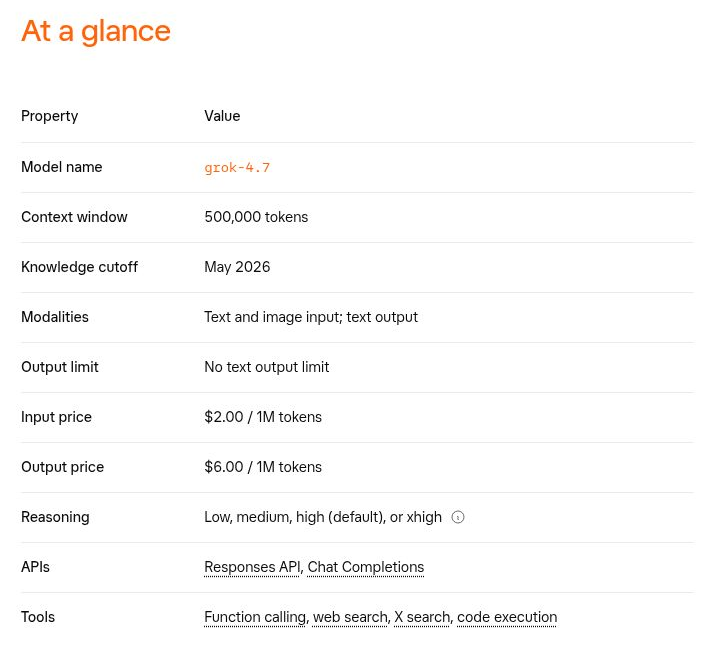
A couple of limits vary across the documentation. Cursor lists 256k standard and 500k long context, so check the app you use. The API guide's May 2026 knowledge-cutoff label also differs from the model card's June pretraining date and later supplemental data. Neither date is a reason to trust an answer about recent events without checking its sources.
How much does Grok 4.7 cost?
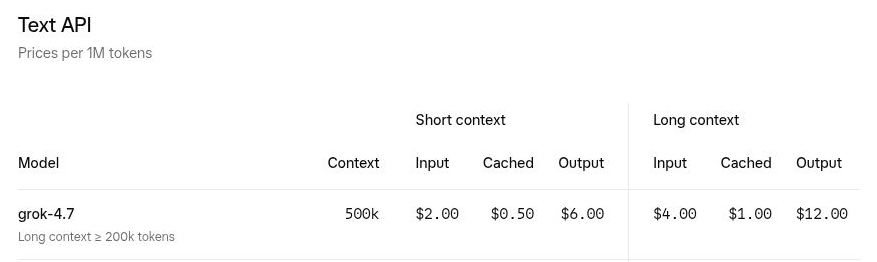
The standard global API starts at $2 per million uncached input tokens and $6 per million output tokens. Uncached means input charged at the normal rate, including repeated material that misses the cache. Input that qualifies for caching costs $0.50 per million. These are usage charges; a Cursor or Grok subscription has its own plan rules.
These standard token rates match Grok 4.6. A job can still cost more if it needs more tokens or repeated attempts. The official rate card separates ordinary requests from longer ones. All prices below are in US dollars per million tokens:
| Option | Input (not cached) | Cached input | Output |
|---|---|---|---|
| Standard API, shorter requests | $2 | $0.50 | $6 |
| Standard API, longer requests | $4 | $1 | $12 |
| Fast in Cursor / Build, shorter requests | $4 | $1 | $12 |
| Fast in Cursor / Build, longer requests | $6 | $1.50 | $18 |
Longer requests cost more once the input reaches about 200,000 tokens. The rate card says 200,000 or more, while some other official wording says above 200,000. Budget for the higher price at that exact boundary. The higher rate applies to the whole request, including the answer, not just the extra input.
A bill in dollars and cents
Suppose you send 100,000 input tokens, 90,000 of them qualify for the cache discount, and Grok generates 10,000 output tokens, including reasoning. At standard rates:
- Input (not cached): 2 cents
- Cached input: 4.5 cents
- Output: 6 cents
- Total: 12.5 cents, before tools and other charges
These are calculated examples, not bills from our own model runs. A longer request with 250,000 uncached input tokens and 10,000 output tokens would cost $1.12. If 200,000 of those input tokens qualified for caching, the total would be 52 cents.
The billing guide counts reasoning at the output rate and cached input toward the long-request threshold. A short final answer can still involve a lot of paid processing.
What is Grok 4.7 Fast?
Fast uses the same model on faster infrastructure and is available only in Cursor and Grok Build. It costs twice the standard token rates for shorter requests, or 1.5 times the longer-request rates. It is excluded from Build's free tier and is not available through the public xAI API.
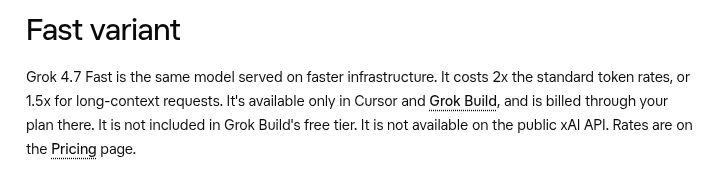
The API has a separate priority-processing option. It doubles token prices when used, but does not guarantee that your whole job finishes twice as fast.
Search can add to the bill
Web search and code execution each add $5 per 1,000 calls, plus applicable tokens. X search charges by the items fetched: $5 per 1,000 posts and $10 per 1,000 profiles. Quoted posts, parent posts and repeated fetches can count too.
Fetching 44 posts and three profiles, for example, adds 25 cents before tokens. The cost of a research job includes finding the information as well as writing the answer.
For other providers, see our AI API price index. Our cost calculator still lists Grok 4.6 as of this check, so do not treat it as a complete 4.7 estimate.
Is Grok 4.7 better at coding?
Several published coding tests show an improvement over Grok 4.6. Whether that improvement saves money depends on the job and the app running it.
A benchmark is a set of test tasks used to compare models. For coding, the surrounding app matters too: it decides which files and tools the model can use and how it handles a long task. A result from Grok Build therefore describes that model-and-app combination.
Artificial Analysis: better results, higher cost
Artificial Analysis reports the following results, checked October 5. All three rows use xhigh reasoning, the highest level Grok offers:
| Model and coding app | Overall score | Estimated cost / test task | Time / test task |
|---|---|---|---|
| Grok 4.6 + Grok Build | 47 | $3.57 | 19.5 min |
| Grok 4.7 + Grok Build | 56 | $8.82 | 39.2 min |
| GPT-6.1 Sol + Codex | 63 | $1.04 | 15.5 min |
Grok 4.7 scores nine points higher than 4.6 here, but costs about 2.47 times as much per test task. The dollar figures are estimated from API token prices. They are not subscription prices or the cost of a guaranteed successful result.
Not sure which AI model to use?
21 models · Personalized picks · 60 seconds
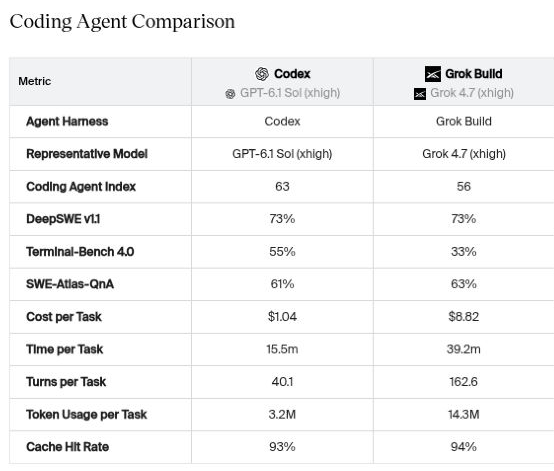
The Coding Agent Index v1.5 combines three tests, DeepSWE, Terminal-Bench and SWE-Atlas-QnA, across 303 tasks with three attempts per task. A score of 56 does not mean Grok will complete 56% of your work. The time column measures the agent's work, excluding setup and grading.
Cursor's test tells a different cost story
On CursorBench 4.0, Grok 4.7 at xhigh scores 46.3% at $6.01 per task. Grok 4.6 at xhigh scores 41.4% at $6.10. Here, the newer model does better at a slightly lower cost. The high setting shows the same direction: 43.9% at $4.69 for 4.7, against 40.4% at $5.20 for 4.6.
Cursor is also a Grok product and training partner. It warns that small score differences can come from variation between test runs. Keep that context with the numbers.
The different bills are a good reason to test your own work. A model can be economical on one set of jobs and expensive on another.
Why a single score is not enough
Even the official sources disagree on a few numbers. The launch post reports 37.6% on Terminal-Bench 4.0 and 64.0% on EEBench. The model card lists 38.0% and 66.0%, with Grok Build at xhigh named for Terminal-Bench. We could not establish the reason for those differences.
XBOW's early-access security tests give another example. Its existing setup got slightly worse results with 4.7, while Build-based setups improved average correct findings from 42 to 68. Those are results from a particular security test using an early model, but they show how much the surrounding software can affect the outcome.
Our task-by-task model guide covers the broader choice between providers.
Three things people built with Grok 4.7
These projects show what people got done, along with the parts that still needed attention. Results and timings are the authors' reports.
A calendar and to-do tool from plain-text files
Dragos Roua asked Grok to work with the task files he already used. It produced a small program with a calendar on the left and tasks on the right, plus controls to add, edit and mark tasks complete. The September 22 video identifies Grok 4.7 at high reasoning on a SuperGrok subscription. The Bash script, screenshot and self-test are public; Bash is the scripting language used to run it in a terminal.
In his September 24 write-up, Roua reports finishing in 45 minutes. His weekly usage meter rose from 14% to 54%. He also promotes his own productivity product in the post. The practical tradeoff is clear: he got a useful personal tool, while using a noticeable share of his plan.
A website rebuilt from an image
On September 21, Hacker News user jjcm shared a website made with Grok 4.7 from a supplied design. The request included moving clouds and a statue whose lighting follows the pointer. You can open both the Grok version and the author's Astra comparison.
The author preferred Astra's contrast, transitions and finish, and said Grok lit the background too strongly. A September 22 reply reported a mobile problem without identifying the device; we have not reproduced it. A good-looking desktop screenshot leaves plenty to check on a phone.
An electronics review that ran out of room
Khalid Abdelaty's September 28 tutorial gives Grok a circuit diagram, technical documents and a program that checks proposed fixes. With the documents, the model found three deliberately planted faults and produced fixes that passed five programmed checks. With only the image, it confirmed one fault and asked for more evidence. The code is public.
The tutorial also shows a run whose conversation grew beyond 1.1 million tokens, exceeding Grok's 500,000-token limit. The tutorial fixes that by shortening the history earlier. Each reasoning setting was tried once, and the checks covered only part of the design; no physical board was validated. It is a useful example of giving AI evidence and checking its answer, with clear limits on what “passed” means.
Other reports are mixed. A September 27 Rust developer post describes useful debugging across files, but also unnecessary code and changes that drifted from the intended design. A September 30 Cursor post complains about credit use at xhigh Fast. Neither provides enough records for a reliable cost or success-rate comparison.
How to use the Grok 4.7 API: developer setup
If you only want to try Grok in a coding app, use the Grok Build guide or select the model in Cursor. This section is for connecting your own software.
The API address is https://api.x.ai/v1, and the model ID is grok-4.7. Follow the official quickstart to create an API key. Keep that key on your server, outside public code and browser apps.
This small example asks for a one-sentence reply, using the documented Responses API settings. We have not run this example. Running it can incur charges.
curl https://api.x.ai/v1/responses \
  -H "Authorization: Bearer $XAI_API_KEY" \
  -H "Content-Type: application/json" \
  -d '{
    "model": "grok-4.7",
    "reasoning": {"effort": "low"},
    "max_output_tokens": 1024,
    "store": false,
    "input": "Reply with one short sentence confirming receipt."
  }'
store: false controls stored responses; it does not replace the provider's data-retention settings. The output limit includes room for reasoning. A real coding task will need a more suitable budget.
Checks before giving it a longer job
- Preserve the conversation correctly. The reasoning guide says to return encrypted reasoning items unchanged when managing your own Responses history. Reasoning cannot be switched off; certain settings, including presence/frequency penalties and stop, are incompatible.
- Make repeat input eligible for caching. Use
prompt_cache_keyand keep the repeated beginning of your input identical. The cache guide explains the setup. Cached data can be cleared, so check actual usage rather than assuming a discount. - Keep history within the limit. Previous messages, answers and tool results all use space. Shorten older history before the next request exceeds the context window.
- Control what tools can do. Your app executes custom function calls. Check their arguments and limit access to files, networks and deployment. Parallel calls are on by default. Our MCP guide explains how tools connect to an assistant.
- Add up every request. The cost-tracking field
usage.cost_in_usd_ticks, divided by 10 billion, gives the billed dollars for a request. Include retries when totaling a job. The docs say Vercel AI SDK does not expose this field; raw REST and OpenAI-compatible responses do.
Grok 4.7 does not support Batch API, so do not apply a generic batch discount. The published base rate limits are 150 requests per second and 50 million tokens per minute, shared by a team for this model. Cached and reasoning tokens count. Check your Console limits and handle rate-limit errors; extra API keys do not create separate allowances.
Can you use private data or run Grok 4.7 locally?
The API privacy policy says inputs and outputs are not used for training without explicit permission. It also describes 30-day default audit retention. That means “not used for training” does not mean “not stored.”
The privacy FAQ describes zero data retention where offered. Enabling it removes features that depend on stored data, including stored conversation state, Files and Collections. Applications can still manage their own conversation history. The enterprise terms include exceptions for agreed settings, legal requirements and safety or security investigations.
Those API policies do not automatically cover consumer Grok, Cursor or another provider. Check the service that will actually receive your data. The US API option costs 10% more. Its location guarantee excludes server-side tools, Files, Collections and data transfer from your own infrastructure.
We found no official Grok 4.7 model download or open-weight license in the sources checked October 5. The documented options run the model on the provider's servers. The service terms grant rights to use the service and outputs within their conditions, not ownership of the model. They also restrict using outputs to train other AI systems unless an Order Form allows it. Read the applicable agreement before using it for client or regulated work; this is not a legal assessment.
How to decide whether Grok 4.7 helps you
Give it a small job you can judge: fix a bug, change a few connected files, or rebuild one page. Write down what a good result needs to do before you start. If you compare it with another model, use the same starting files, instructions and tools.
Then look at three things:
- Did the result work? Run the tests or try the feature. Count the fixes you had to make yourself.
- How long did the whole job take? Include failed attempts and your review time.
- What did you pay for usable work? Add all attempts, including failures, and divide by the number of results you would keep.
For example, spending $10 across five attempts that produce two usable results means $5 per usable result. That tells you more than the price of one answer. This is an illustration of the calculation, not a Grok test result.
Our reasoning-effort comparison shows how testing different settings can make the choice more concrete. Its winning setting does not automatically carry over to Grok.
Grok 4.7 has useful public examples and stronger results in several coding tests. Start with a small budget and a result you can check. If it takes more attempts, corrections or money than your current setup, the higher benchmark score has not helped with that job.
Sources and research scope
This guide uses official product and pricing documentation, benchmark operators' published results and original developer reports checked October 5, 2026. The wording was revised October 6. We checked the linked public materials but did not run paid Grok sessions, reproduce the developers' builds or validate hardware. Live scores and product details can change.
Key sources are the release announcement, developer guide, pricing page, model card, Artificial Analysis methodology and CursorBench. The article links individual claims to their supporting page.
The banner uses the official Grok symbol from the brand asset pack, without implying sponsorship or endorsement.
Grok 4.7 FAQ
What is Grok 4.7 used for?
Grok 4.7 is an AI model for writing and fixing code, answering questions and carrying out multi-step tasks with tools. It accepts text and images and returns text. Developers can use it through the xAI API, Cursor or Grok Build.
How much does the Grok 4.7 API cost?
As checked October 5, 2026, the standard global API charges $2 per million uncached input tokens, $0.50 for cached input and $6 for output. Longer requests use rates of $4, $1 and $12 for the whole request. The pricing table puts the higher-rate threshold at 200,000 input tokens, though wording differs at the exact boundary. Reasoning and search can add to the bill.
Is Grok 4.7 Fast available in the public API?
No. The official guide limits Fast to Cursor and Grok Build, and excludes it from Build's free tier. Fast uses the same model on faster infrastructure. Its token rates are twice standard short-context prices, or 1.5 times standard long-context prices.
What does the 500,000-token context window mean?
It is the amount of information Grok 4.7 can work with at once through the public API. Tokens are small pieces of information. Conversation history and tool results use that space too, and the model needs room for its next response. The 500,000-token capacity is separate from the roughly 200,000-token input threshold for higher pricing.
Is Grok 4.7 better than Grok 4.6 for coding?
Grok 4.7 scores higher in several published coding tests, but its cost and speed depend on the task and coding app. Artificial Analysis found a higher score with Grok Build alongside a higher estimated cost per test task. CursorBench reported a higher score at a slightly lower task cost.
Can you run Grok 4.7 on your own computer?
No official Grok 4.7 model download or open-weight license was found in the sources checked October 5, 2026. The verified options use the model online through the API or supported coding products. Installing a coding app does not mean the model runs locally.

Founder of Spectrum AI Labs — testing AI tools and models, and writing up what actually ships.
More about Paras →Stay ahead of the AI curve
We test new AI tools every week and share honest results. Join our newsletter.