Back to AI tools directory

Midjourney

Midjourney guide for practical AI users

An AI image generation tool known for strong visual style, concept art, and creative image exploration.

Quick take

Midjourney is useful when the job is visual direction, not exact production layout. Use it for moodboards, ad concepts, thumbnails, hero image directions, packaging explorations, and style studies. It works best when you control the subject, aspect ratio, references, and review criteria before generating.

Best fit

Use Midjourney when you need strong image options quickly and can still edit, select, and approve the final asset outside Midjourney.

First setup

1

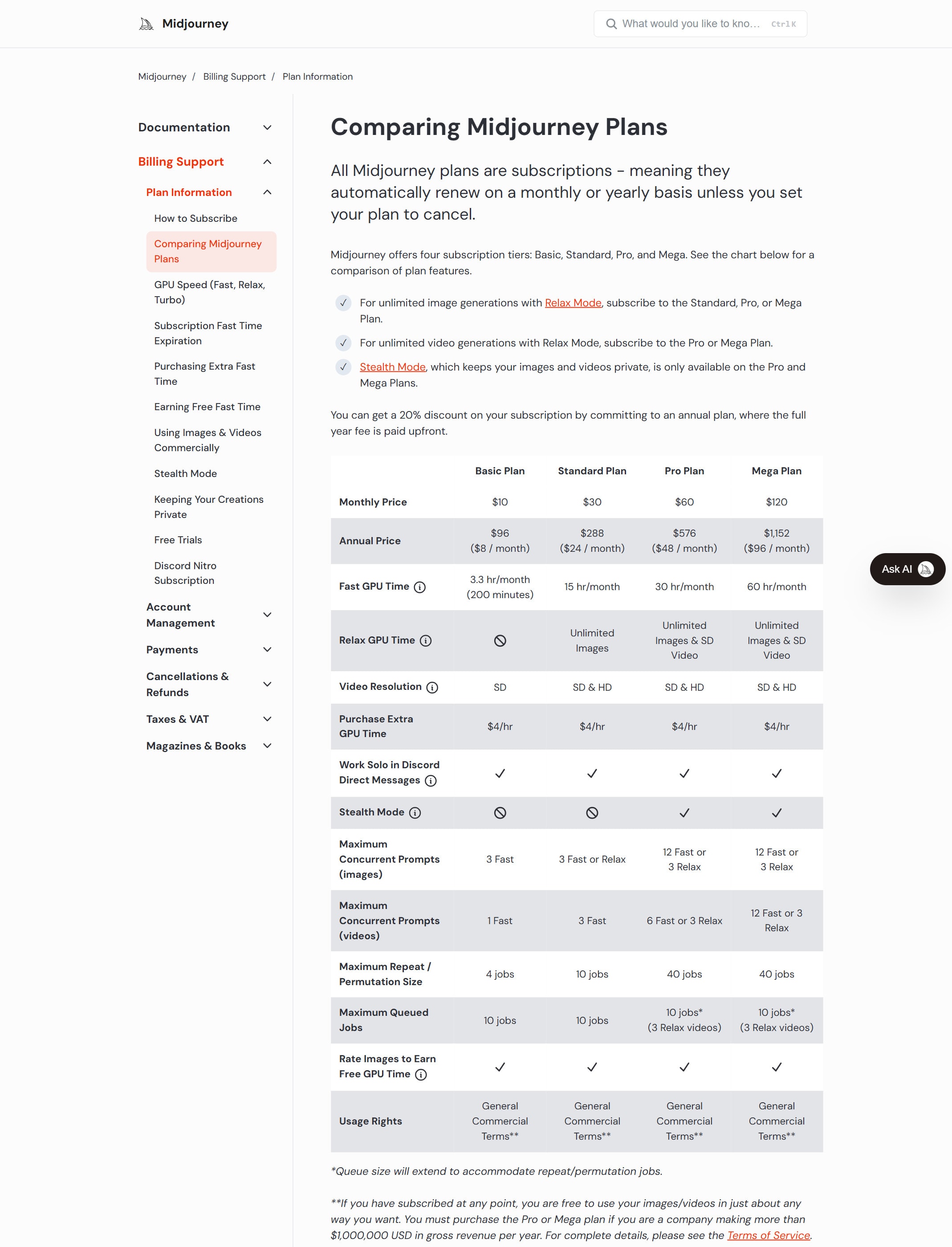
Check the plan docs first because Midjourney is subscription based and plan features differ.

2

Create one folder or moodboard for the campaign so useful outputs do not get lost.

3

Write the asset goal before prompting: audience, channel, aspect ratio, subject, mood, and constraints.

4

Start with one prompt style, generate options, then change one variable at a time.

5

Use style references, image prompts, moodboards, or the Editor only after the first direction is clear.

6

Save the final prompt, references, and selected image so the look can be repeated later.

Workflows worth trying

Build a campaign moodboard

Useful when a founder, marketer, or designer needs a clear visual direction before making final assets.

  1. Write the campaign message and choose the channel first.
  2. Collect 3 to 6 visual references for color, lighting, composition, and mood.
  3. Generate 12 to 20 options around one idea instead of mixing many ideas in one prompt.
  4. Pick 3 directions and write why each one works or fails for the campaign.
  5. Use the selected image as a direction brief for the final designer, editor, or ad asset.

Create a blog or landing page hero concept

Useful when the page needs a distinct visual idea but the final layout will still be handled in design or code.

  1. Decide the hero size and whether text will be added outside Midjourney.
  2. Prompt for the main scene, material, camera angle, lighting, and negative constraints.
  3. Avoid asking Midjourney to create important text inside the image.
  4. Review the image on mobile width before using it as a banner.

Keep a repeatable brand look

Useful when you want multiple assets to feel related across blogs, newsletters, ads, and social posts.

  1. Create or choose a small set of approved reference images.
  2. Use style references or moodboards to keep the visual language consistent.
  3. Lock common rules such as angle, lighting, background style, and color range.
  4. Do a final review for brand fit, rights, odd details, faces, hands, and product accuracy.

Prompt recipes

Campaign concept image

Create a [aspect ratio] image for [campaign]. Subject: [specific subject]. Setting: [setting]. Lighting: [lighting]. Style: [style direction]. Mood: [mood]. Avoid text, logos, extra hands, and clutter.

It gives Midjourney visual controls instead of a vague request.

Brand-consistent variation

Use this reference for style. Create a new image with [subject] for [channel]. Keep the same lighting, material feel, and color range. Change only the scene.

It helps create related assets without copying the exact same image.

Image review checklist

Review this image for brand fit, visual clarity, strange details, text errors, likeness risk, and whether it works as a [blog banner/ad/thumbnail].

It turns the output into something to inspect before publishing.

Buying advice

Basic is for light testing

Use Basic only when you want to test whether the Midjourney workflow fits your style and output needs.

Standard fits regular image work

Standard makes more sense when you need repeated image exploration and can use Relax Mode for non-urgent work.

Pro or Mega fits privacy and heavier output

Midjourney says Stealth Mode is available only on Pro and Mega, so check these plans if private generation matters.

Check commercial terms before client work

Midjourney's plan docs point users to the Terms of Service for full usage rights, so verify those terms before using outputs in paid work.

Watchouts

  • Do not rely on Midjourney for exact text in images. Add final text in a design tool.
  • Do not publish an output without checking small details, faces, hands, brand marks, and rights risk.
  • Do not use public generation for sensitive client work without checking privacy settings and plan limits.
  • Do not keep generating randomly. Change one prompt variable at a time so you know what improved the result.

Best for

  • Moodboards and campaign concepts
  • Strong visual exploration
  • Creative assets that need a clear look

Not for

  • Work that needs exact text in images
  • Teams that need a free plan before testing

How to use it well

Use it to find the visual direction first, then refine prompts around composition, lighting, style, and brand constraints. Do not skip final human review.

Pricing note

Paid subscription plans are listed in Midjourney's official plan documentation.

We link to Midjourney plan docs instead of copying every price into this page. That is safer because AI tool pricing, usage limits, and plan names change often.

How to decide

Choose this if image quality and visual exploration matter more than app integrations.

Related tools

Compare Midjourney with other tools in nearby categories.

Google

Gemini

Free plan

Google's AI assistant for search-style help, writing, productivity, image work, and Workspace-related tasks.