Back to AI tools directory

Anthropic

Claude guide for practical AI users

A conversational AI assistant often used for long documents, careful writing, coding help, and structured reasoning.

Quick take

Claude is best when the work needs careful reading, rewriting, planning, or code review. It is strong with long source material and useful when you want a calm second opinion before you send, ship, or spend money. The weak point is that polished answers can still hide gaps, so you need to ask it to show what it used and what it is unsure about.

Best fit

Use Claude for documents, briefs, specs, code reviews, research notes, policy drafts, and messy decisions. It works well when you can give it source material and ask for a clear output.

First setup

1

Open Claude and create a project for one real job, such as a hiring plan, product spec, legal-style policy draft, weekly report, or technical review.

2

Add only the files that matter. Keep private customer data out unless your account type, privacy settings, and company policy allow that use.

3

Write project instructions in plain English. Tell Claude the audience, tone, format, and what it should avoid.

4

Start with one source-based task. Ask Claude to summarize the facts, questions, risks, and next action.

5

Ask for a second pass that cuts vague claims and marks anything that needs human checking.

Workflows worth trying

Turn a long document into a decision brief

Useful when a PDF, transcript, policy, contract, or research dump is too long to act on directly.

  1. Upload or paste the source material and explain the decision you need to make.
  2. Ask Claude for the answer first, then the evidence, assumptions, risks, and open questions.
  3. Ask it to quote the exact source lines for anything important.
  4. Use the final brief to decide what to read yourself before acting.

Rewrite important copy without losing the point

Useful for emails, reports, founder updates, landing page sections, internal notes, and sensitive replies.

  1. Paste the rough draft and say who will read it.
  2. Ask Claude to keep the meaning but make the writing shorter and easier to understand.
  3. Ask for one direct version and one warmer version.
  4. Read the final copy out loud and remove anything you would not say.

Review a technical plan before work starts

Useful before a developer builds a feature, an operator changes a workflow, or a founder buys a tool.

  1. Paste the plan, constraints, and what success should look like.
  2. Ask Claude to find missing steps, risky assumptions, unclear ownership, and hidden costs.
  3. Ask it to turn the plan into a smaller first test.
  4. If code is involved, use Claude Code only after you are ready to review diffs and commands.

Prompt recipes

Source-based summary

Read this material and answer in this order: 1. short answer, 2. facts from the source, 3. assumptions, 4. risks, 5. next action. If the source does not support a claim, say so.

It stops the answer from becoming a smooth summary with no source trail.

Rewrite with judgment

Rewrite this for [audience]. Keep the meaning. Use simple English. Cut filler. Do not add claims. After the rewrite, list anything you changed that could affect meaning.

It gives Claude permission to improve the writing while forcing it to show risky edits.

Plan review

Review this plan as if I have to spend money on it this week. What is weak, what is missing, what should be tested first, and what decision can wait?

It asks Claude to challenge the plan instead of making it sound better.

Buying advice

Start on Free if you are testing the habit

Free is enough to see whether Claude fits your reading, writing, and planning work. Upgrade only when limits block work you already repeat.

Pro fits solo users with daily document work

Pro is the better starting point if you use projects, longer sessions, Research, Claude Code, or Claude Cowork often enough that the free limits get in the way.

Max is for heavy use, not casual testing

Max makes sense when usage limits are the problem. If you only use Claude a few times a week, start lower and check the official plan page later.

Team or Enterprise is the business route

Use work plans when shared projects, admin controls, connectors, central billing, or stronger governance matter more than a personal subscription.

Watchouts

  • Do not accept a clean answer as proof. Ask Claude what source lines support the answer.
  • Do not let memory quietly shape sensitive work. Check memory, chat search, and incognito settings before using Claude for private material.
  • Do not upload confidential files unless your plan, policy, and data settings allow it.
  • Do not use Claude Code like an autopilot. Review file edits, terminal commands, and commits before you trust the result.

Official sources to check

Best for

  • Working through long documents and messy notes
  • Drafting clear internal documents
  • Reviewing code, plans, or arguments with a second pair of eyes

Not for

  • Teams that need one-click integrations with every app
  • Tasks where you will not check important outputs

How to use it well

Paste the source material, define the decision you need to make, and ask for a short answer first. Then ask for risks, missing facts, and the next action.

Pricing note

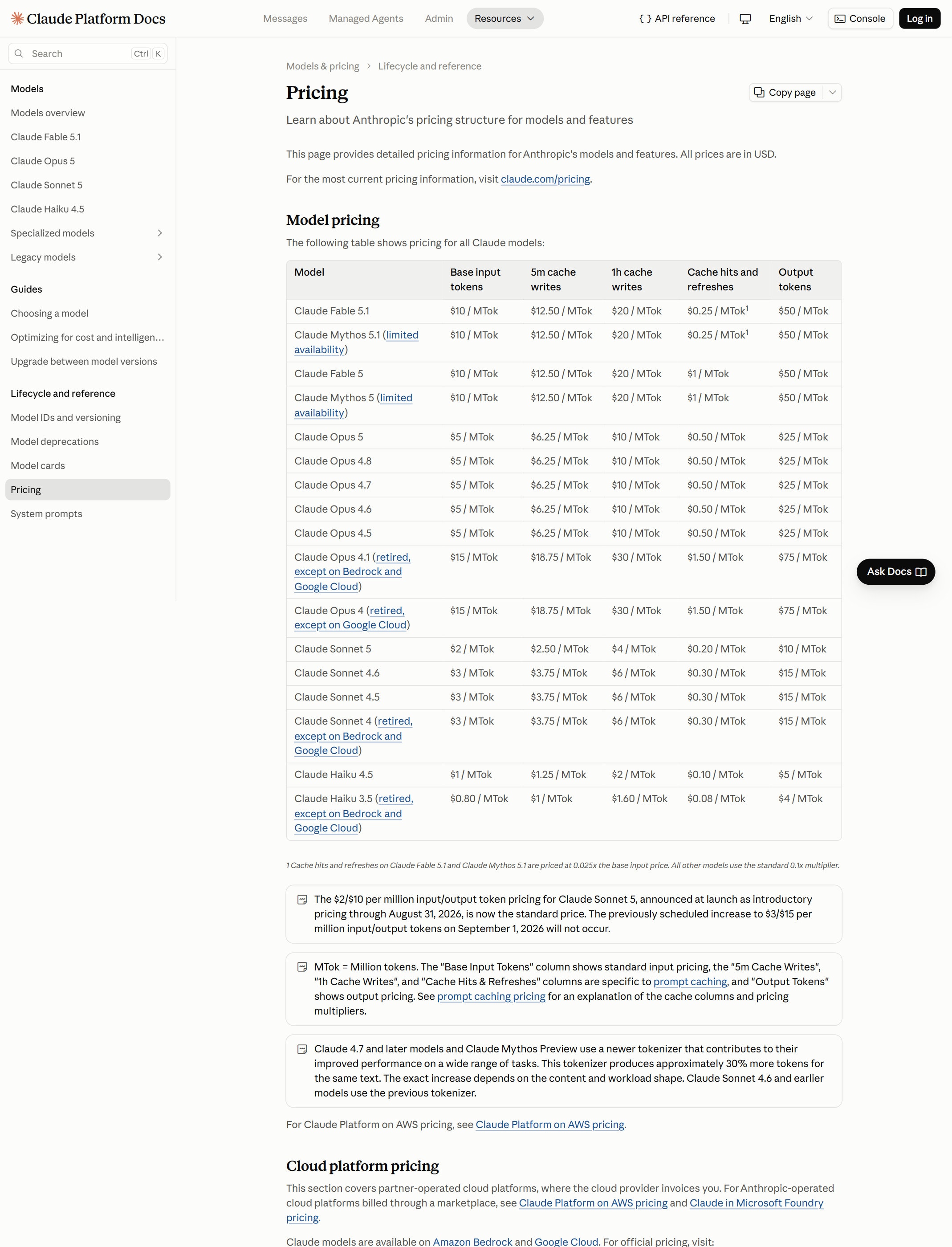
Free plan available. Paid plans are listed on Claude's official pricing page.

We link to Claude pricing instead of copying every price into this page. That is safer because AI tool pricing, usage limits, and plan names change often.

How to decide

Choose this if you spend more time reading, editing, reviewing, and thinking through complex work than making images or videos.

Check the calculator before you move high-volume Claude work from chat into API usage.

Related tools

Compare Claude with other tools in nearby categories.

OpenAI

ChatGPT

Free plan

A general AI assistant for writing, research, planning, data analysis, coding help, and everyday work.

Google

Gemini

Free plan

Google's AI assistant for search-style help, writing, productivity, image work, and Workspace-related tasks.