Back to AI tools directory

DeepSeek

DeepSeek guide for practical AI users

A low-cost AI assistant and open-weight model family from a Chinese AI lab, used for chat, coding help, and research at a fraction of the price of larger providers.

Quick take

DeepSeek is an AI lab that ships both a free consumer chat app and open-weight models you can download and run. It is one of the cheapest ways to get strong reasoning and coding help through an API, and the models hold up against larger providers on many tasks. The real trade-off is data governance: the hosted service runs on servers subject to Chinese law, so sensitive business data needs care.

Best fit

Use DeepSeek when cost is a real constraint and you still want good reasoning or coding output. It fits developers testing ideas cheaply, cost-conscious founders, and technical teams that can self-host the open weights when data control matters.

First setup

1

Open the DeepSeek web app or install the mobile app and sign in to use the chat for free.

2

For building, create an account on the DeepSeek API platform and generate an API key. New accounts include a small block of free tokens to test with.

3

Pick a model on purpose: the lighter model for fast, cheap tasks and the heavier model when a job needs deeper reasoning.

4

Turn on context caching so repeated system prompts and long documents are not billed at full rate on every call.

5

If you need full data control, download the open weights from the official model pages and run them on your own hardware or a private host.

Workflows worth trying

Cut API costs on a repetitive task

Useful when you run the same kind of prompt many times a day, such as tagging tickets, drafting replies, or pulling fields out of text.

  1. Write one clear prompt with a fixed instruction block and a slot for the changing input.
  2. Send it through the lighter model first and check the output quality on real examples.
  3. Turn on context caching so the fixed instruction block is not billed at full price on every call.
  4. Move the task to the heavier model only if the lighter one misses on cases that matter.

Get a second opinion on code

Useful for founders and developers who want a cheap review before shipping a change.

  1. Paste the function or file and say what it should do and what you are unsure about.
  2. Ask DeepSeek to find bugs, edge cases, and unclear names, and to explain its reasoning.
  3. Ask for a corrected version with comments on what changed and why.
  4. Test the change yourself before you commit it.

Prompt recipes

Cheap structured extraction

From the text below, return only JSON with these fields: [field list]. If a field is missing in the text, use null. Do not add fields or commentary. Text: [paste text]

A fixed schema and a null rule keep the output clean enough to use in code without extra parsing.

Reasoning with its work shown

Solve this step by step, then give a short final answer on its own line. If any step depends on an assumption, state the assumption. Problem: [paste problem]

It uses the model's reasoning strength while making the assumptions visible so you can check them.

Buying advice

Start free in the chat app

The web and mobile chat are free and enough to judge whether the answers fit your work before you write any code.

Use the API when you build, and start on the lighter model

Pay-per-token API access fits automated or high-volume work. Begin with the cheaper model and move up only when a task clearly needs it.

Self-host the open weights for data control

If sending data to the hosted service is a problem, run the open-weight models on your own hardware or a private host. This costs infrastructure and setup time in exchange for control.

Watchouts

  • The hosted service runs on servers subject to Chinese law. Do not send confidential or regulated data through it unless your policy and legal review allow it.
  • Cheap output is still not checked output. Verify facts and test code before you rely on it.
  • Model names and free-token terms change. Read the official pricing page before you commit a workload.
  • Content controls on the hosted chat can affect some topics. Self-hosting the open weights avoids that but shifts the work to you.

Best for

  • Getting strong reasoning and coding help without paying premium API rates
  • Running an open-weight model yourself when you need control over your data
  • Everyday chat and research through the free web app and mobile app

Not for

  • Teams that cannot send data to servers or models governed by Chinese data rules
  • Work where you will not check important facts or code before using it

How to use it well

Use the free chat app for daily questions and drafts. If you build with the API, start with the lighter model and only move up when a task needs deeper reasoning, and turn on context caching so repeated prompts cost less.

Pricing note

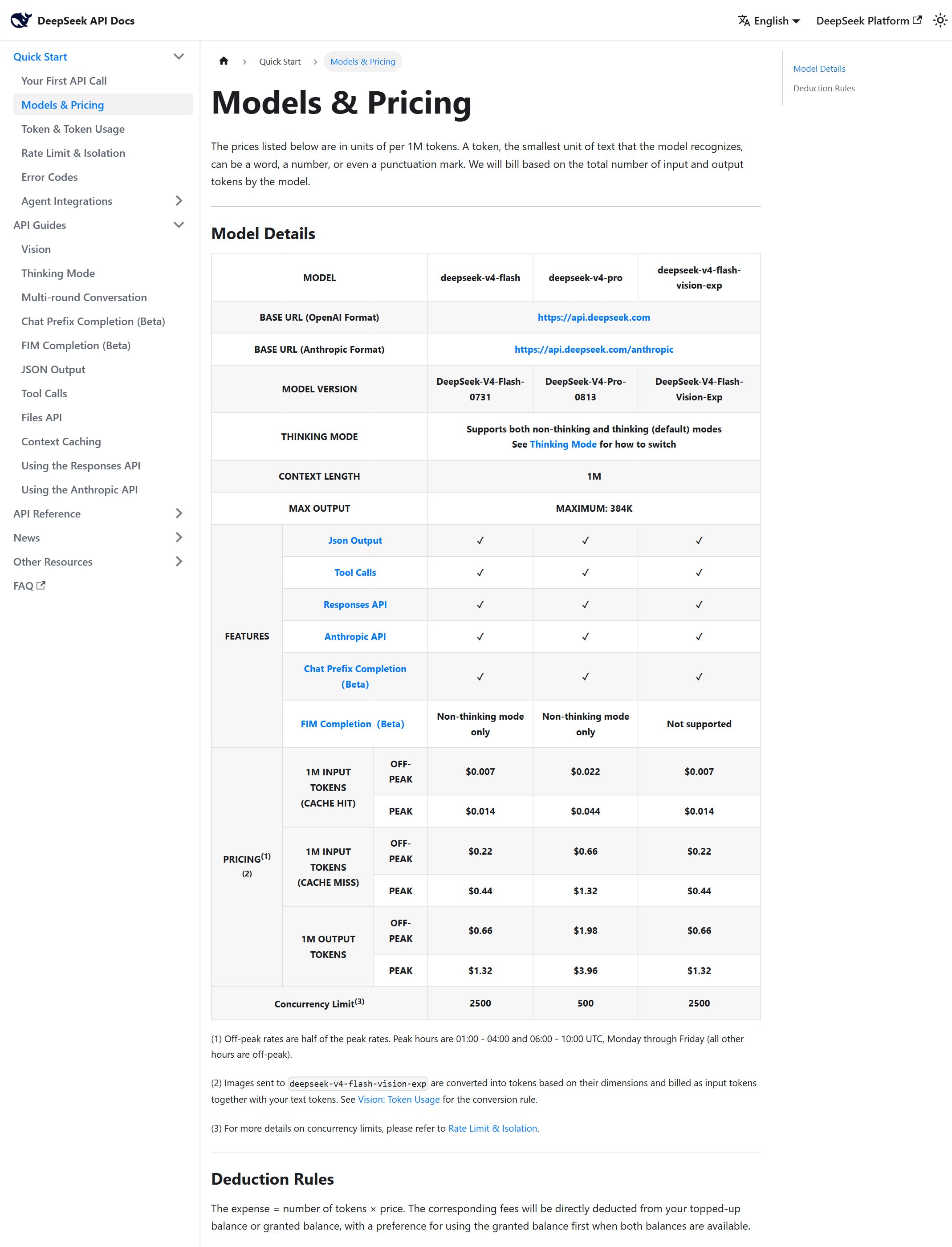
Free chat app and mobile app. API usage is billed per token and is listed on DeepSeek's official API pricing page.

We link to DeepSeek API pricing instead of copying every price into this page. That is safer because AI tool pricing, usage limits, and plan names change often.

How to decide

Choose this if you want strong reasoning and coding help at the lowest cost, or an open-weight model you can run yourself.

Use the calculator to compare DeepSeek API costs against other models before you move high-volume work onto it.

Related tools

Compare DeepSeek with other tools in nearby categories.

OpenAI

ChatGPT

Free plan

A general AI assistant for writing, research, planning, data analysis, coding help, and everyday work.

Anthropic

Claude

Free plan

A conversational AI assistant often used for long documents, careful writing, coding help, and structured reasoning.

Google

Gemini

Free plan

Google's AI assistant for search-style help, writing, productivity, image work, and Workspace-related tasks.