Back to AI tools directory

Gamma

Gamma guide for practical AI users

An AI presentation and document tool for turning prompts, outlines, and notes into visual pages.

Quick take

Gamma is useful when the output should be a deck, visual explainer, proposal, one-page site, or client-ready draft. It is strongest when you bring a real outline or source material. It is weakest when you ask it to invent strategy, numbers, or positioning from a vague prompt.

Best fit

Use Gamma for sales decks, founder updates, course explainers, internal docs, lightweight sites, and client proposals that need structure and design faster than a blank PowerPoint file.

First setup

1

Check the pricing page first because credits, card limits, branding, analytics, domains, and exports differ by plan.

2

Write the goal, audience, offer, proof, and call to action before generating.

3

Start from an outline, pasted notes, imported deck, PDF, or source links instead of a broad prompt.

4

Approve the outline before generating the full deck or document.

5

Remove generic slides and replace vague claims with your own facts, examples, screenshots, and numbers.

6

Export or publish only after checking mobile view, source accuracy, branding, and sharing settings.

Workflows worth trying

Create a practical sales deck

Useful when a founder or sales team needs a clear deck for calls, follow-ups, or outbound replies.

  1. Write the customer problem, target buyer, offer, proof, pricing note, and next step.
  2. Generate a short deck with one idea per card.
  3. Cut any slide that sounds like generic marketing copy.
  4. Add real screenshots, customer examples, numbers, and objections.
  5. Export to PPTX only after the message works inside Gamma.

Turn a long doc into a visual explainer

Useful when a blog, report, lesson, or internal memo needs to become easier to present.

  1. Import the source doc or paste the cleaned outline.
  2. Use Agent to shape the narrative before generating.
  3. Ask for fewer cards than the source seems to need.
  4. Replace summary cards with specific examples and decisions.
  5. Share a read-only link for review, then export only after edits are final.

Publish a lightweight resource page

Useful for a public explainer, portfolio page, simple campaign page, or resource hub.

  1. Decide whether the output should stay as a deck or become a Gamma site.
  2. Use a Gamma subdomain for testing and a custom domain only when the page is worth keeping live.
  3. Check navigation, mobile preview, images, links, and site settings before publishing.
  4. Avoid using Gamma as a blog or ecommerce system because Gamma's own docs say those site features are not supported.

Prompt recipes

Deck outline

Create a 7-card deck outline for [audience] about [offer]. Include problem, current cost, better process, proof, objections, next step, and one card that should be deleted if it sounds generic.

It gives Gamma a structure that can be checked before design work starts.

Source-based explainer

Use only the attached source material. Create a short visual explainer for [audience]. Cite where each factual claim came from and mark any claim that needs human review.

It reduces made-up claims and makes review easier.

Proposal cleanup

Review this proposal deck. Remove generic promises, shorten crowded cards, identify missing proof, and rewrite the next step so the reader knows exactly what to do.

It turns a polished-looking draft into something a buyer can act on.

Buying advice

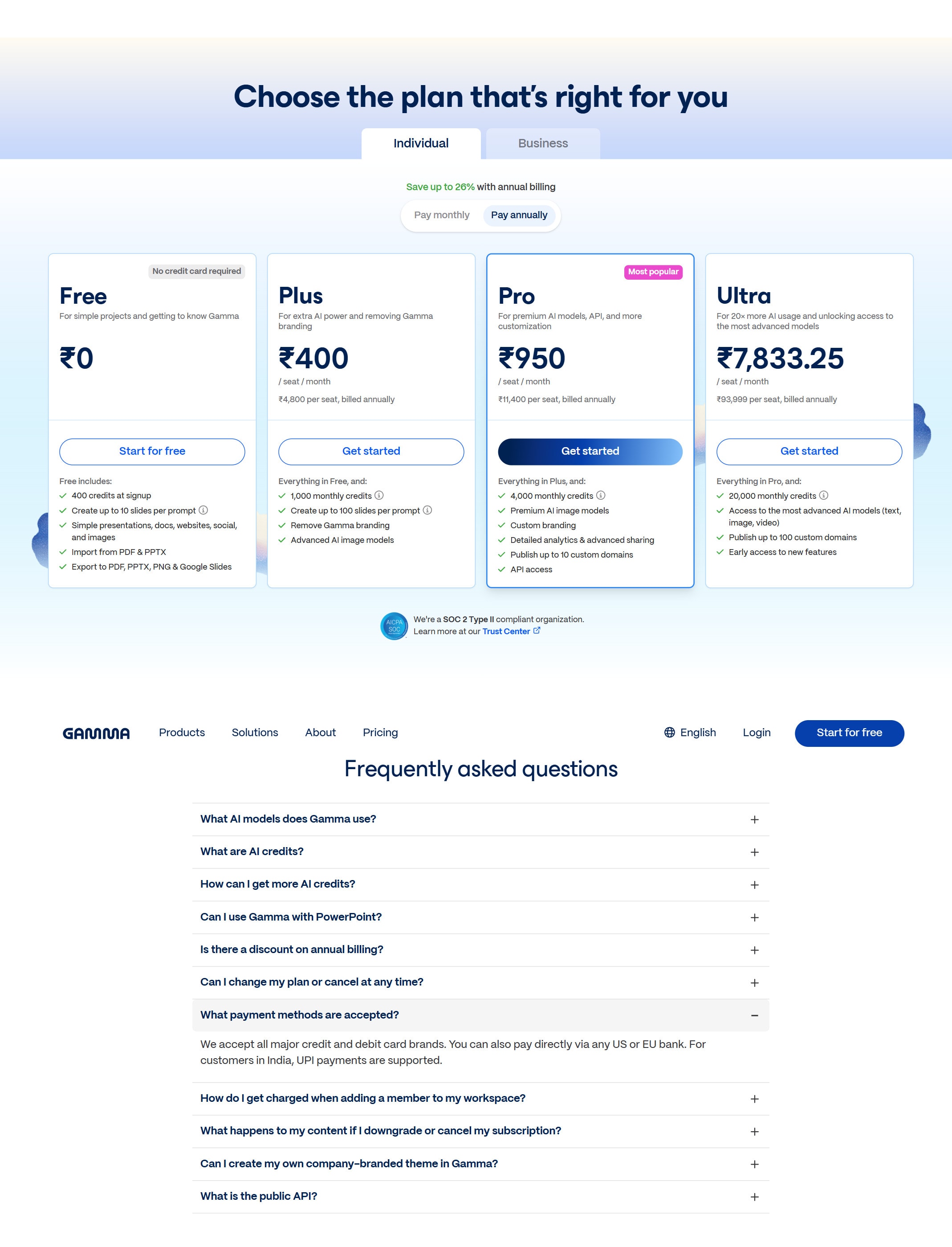
Free is fine for testing

Use Free to test whether Gamma's cards, imports, exports, and AI generation fit the way you work.

Plus fits simple recurring decks

Check Plus when you want more AI creation and need to remove Gamma branding from regular work.

Pro fits branded work and sites

Use Pro when custom branding, custom fonts, analytics, advanced sharing, custom domains, or API access matter.

Ultra fits heavy AI use

Check Ultra only if you need the highest AI usage and the most advanced text, image, or video model access listed on Gamma's pricing page.

Watchouts

  • Do not let Gamma invent market data, pricing, or proof. Bring the facts yourself.
  • Do not send a generated deck without rewriting the generic slides.
  • Do not assume imported styles will carry over perfectly. Gamma says imported text and layouts may need manual work.
  • Do not use Gamma sites for blogging or ecommerce because Gamma says those site features are not supported.
  • Do not buy a higher plan before checking card limits, credits, branding, exports, analytics, and domain needs.

Official sources to check

Best for

  • Fast first drafts of decks and explainers
  • Founder and sales materials
  • Turning structured notes into a visual format

Not for

  • Final investor decks without detailed human editing
  • Teams with strict custom presentation systems

How to use it well

Start from a real outline, not a vague prompt. Ask for a short deck, remove generic slides, and rewrite the claims in your own voice before sharing.

Pricing note

Free and paid plans are listed on Gamma's official pricing page.

We link to Gamma pricing instead of copying every price into this page. That is safer because AI tool pricing, usage limits, and plan names change often.

How to decide

Choose this if the output is a deck, proposal, or visual explainer rather than a long article.

Related tools

Compare Gamma with other tools in nearby categories.

OpenAI

ChatGPT

Free plan

A general AI assistant for writing, research, planning, data analysis, coding help, and everyday work.

Anthropic

Claude

Free plan

A conversational AI assistant often used for long documents, careful writing, coding help, and structured reasoning.

Google

Gemini

Free plan

Google's AI assistant for search-style help, writing, productivity, image work, and Workspace-related tasks.