Back to AI tools directory

Replit

Replit guide for practical AI users

A browser-based coding workspace with AI support for building, testing, and deploying small projects.

Quick take

Replit is useful when you want to get from idea to working prototype without setting up a local coding environment. Agent can help plan, build, test, and publish an app from plain language, but you still need to review the result. It is best for small apps, learning projects, quick demos, and early product tests.

Best fit

Use Replit when speed matters more than perfect architecture. It works well for landing page experiments, internal tools, simple full-stack apps, class projects, and prototypes that need a live URL quickly.

First setup

1

Create a free Replit account and start with one small app idea.

2

Write the app goal, user type, core screens, and data you need before asking Agent to build.

3

Use Plan Mode first if the idea is unclear. Do not let Agent build until the scope is small enough to review.

4

After each build, open the preview, test the main user path, and use checkpoints before major changes.

5

Check billing, credits, and deployment settings before keeping an app live.

Workflows worth trying

Build a quick MVP

Useful when a founder or student needs a working version before deciding whether the idea deserves more time.

  1. Describe one user, one problem, and one action the app should handle.
  2. Ask Agent to propose the simplest version before building.
  3. Approve the plan, then test the generated app from the user's point of view.
  4. Use follow-up prompts for fixes only after you list the exact bug or missing behavior.

Learn by changing a working app

Useful for beginners who understand faster by editing a real project.

  1. Ask Agent to explain the files that matter before changing anything.
  2. Make one small change, such as a form field, button, page, or database value.
  3. Preview the app and ask why the change worked or failed.
  4. Save the working checkpoint before starting the next change.

Publish a test app safely

Useful when you need a live demo but do not want surprise costs or public mistakes.

  1. Remove sample secrets, fake user data, and placeholder admin routes.
  2. Check the deployment type and expected usage before publishing.
  3. Open the public URL in a private browser window and test the full flow.
  4. Watch logs and usage after sharing the link.

Prompt recipes

Small app brief

Build the smallest version of [app idea]. User: [who]. Main action: [one action]. Pages needed: [list]. Data needed: [list]. Before coding, give me the plan and what you will not build yet.

It keeps Agent from turning a simple prototype into a large project you cannot review.

Bug fix with a checkpoint

Before fixing this bug, create or confirm a checkpoint. Bug: [describe]. Expected behavior: [describe]. Actual behavior: [describe]. Change only the files needed.

It makes rollback part of the workflow before the edit starts.

Review before publish

Review this app before I publish it. Check broken routes, obvious security issues, fake data, missing error states, and anything that could create unexpected cost.

It turns Agent into a pre-publish checklist instead of only a builder.

Buying advice

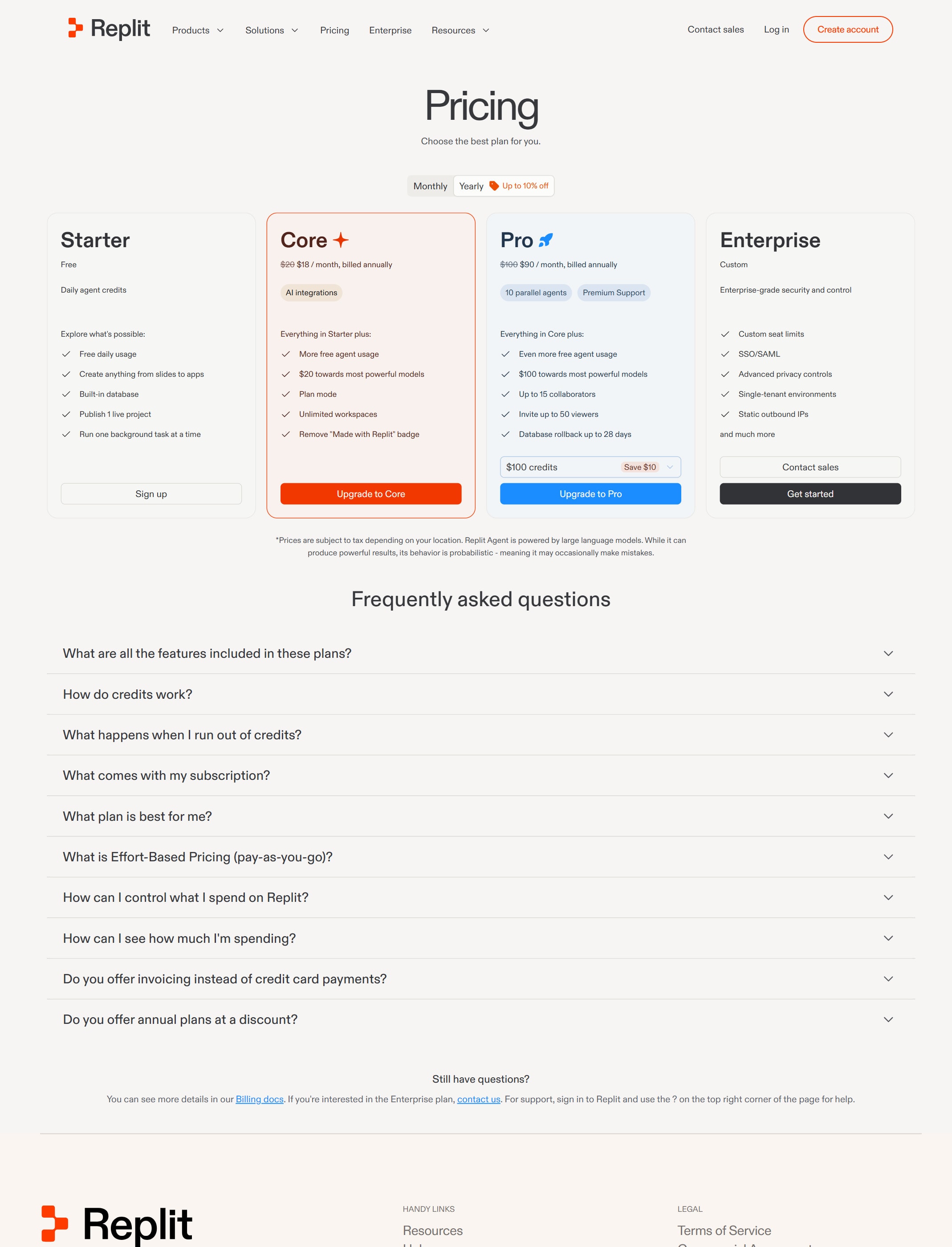
Free is enough for first tests

Use Starter to learn the workflow and test whether Agent can build the kind of app you need.

Core fits personal projects and simple apps

Core is the next step when you need more Agent work, monthly credits, publishing, and collaboration than the free plan gives.

Pro is for serious builds

Pro is better when you need more credits, more collaborators, more parallel agents, stronger models, and commercial work.

Watch usage-based costs

Replit credits can apply to Agent, publishing, network transfer, databases, and storage. Check billing docs before leaving apps live.

Watchouts

  • Do not treat a working preview as production-ready. Test the user flow and inspect the generated code.
  • Do not keep secrets in code. Replit documents a Secrets tool for sensitive values.
  • Do not skip checkpoints before large Agent changes.
  • Do not publish an app without checking deployment cost and public access.

Official sources to check

Best for

  • Fast prototypes without local setup
  • Learning by building
  • Simple apps, scripts, and experiments

Not for

  • Complex production systems with strict infrastructure needs
  • Teams that already have a mature local development setup

How to use it well

Use Replit to validate a small idea quickly. Keep the scope narrow, test each step, and move serious projects into a proper repo when they grow.

Pricing note

Free and paid plans are listed on Replit's official pricing page.

We link to Replit pricing instead of copying every price into this page. That is safer because AI tool pricing, usage limits, and plan names change often.

How to decide

Choose this if you want to build a working prototype and avoid installing a local development stack at the start.

Check costs before using hosted compute for long-running projects.

Related tools

Compare Replit with other tools in nearby categories.

OpenAI

ChatGPT

Free plan

A general AI assistant for writing, research, planning, data analysis, coding help, and everyday work.

Anthropic

Claude

Free plan

A conversational AI assistant often used for long documents, careful writing, coding help, and structured reasoning.