Back to AI tools directory

Lovable

Lovable guide for practical AI users

An AI app builder that turns plain-English chat into a deployed full-stack web app, with the database, login, and hosting wired up for you.

Quick take

Lovable turns a plain-English chat into a working web app and can wire up the frontend, a Supabase database, and login for you. It fits founders and small teams who want a live prototype fast, but the generated code and database rules still need a human review. Its real weak point is security, since published apps have shipped with access-control gaps that leaked user data.

Best fit

Use Lovable when you want a live app or internal tool quickly and can keep the scope small. It works well for MVPs, landing pages, simple SaaS, and demos that need a shareable URL, as long as someone reviews the result before real users arrive.

First setup

1

Create a free Lovable account and start with one small app idea.

2

Write the app goal, the main user, the core screens, and the data you need before you prompt.

3

Ask for the simplest version first, then connect Supabase when you need a database, login, or stored files.

4

After each build, open the preview and test the main user path before asking for more.

5

Run the pre-publish security scan and review the generated code before you publish or share the app.

Workflows worth trying

Ship a first MVP

Useful when a founder needs a working app to test an idea before spending more time or money.

  1. Describe one user, one problem, and the single action the app must handle.
  2. Ask Lovable for the smallest working version and a short plan before it builds.
  3. Test the generated app as that user and note what is missing or broken.
  4. Add features one prompt at a time so each change stays easy to review.

Add a database and login safely

Useful when a prototype needs real accounts or stored data, which is where security gaps usually show up.

  1. Connect Supabase from the integrations panel before asking for auth or data features.
  2. Ask Lovable to add login and the tables you need, then review the access rules it creates.
  3. Store API keys and secrets in the secrets tool, not in the code or chat.
  4. Run the security scan and fix flagged issues before you publish.

Prompt recipes

Small app brief

Build the smallest version of [app idea]. Main user: [who]. Core action: [one action]. Screens: [list]. Data to store: [list]. Before building, show me the plan and what you will leave out for now.

It keeps Lovable from expanding a simple prototype into a large app you cannot review.

Pre-publish review

Review this app before I publish it. Check the access rules on every table, exposed secrets, broken routes, missing error states, and anything that could leak user data or create cost.

It turns the model into a pre-publish checklist and points it at the access-control gaps Lovable apps are known for.

Buying advice

Free plan for first tests

Use the free plan to learn the chat workflow and check whether Lovable can build the kind of app you need before you pay.

Paid solo plan for regular building

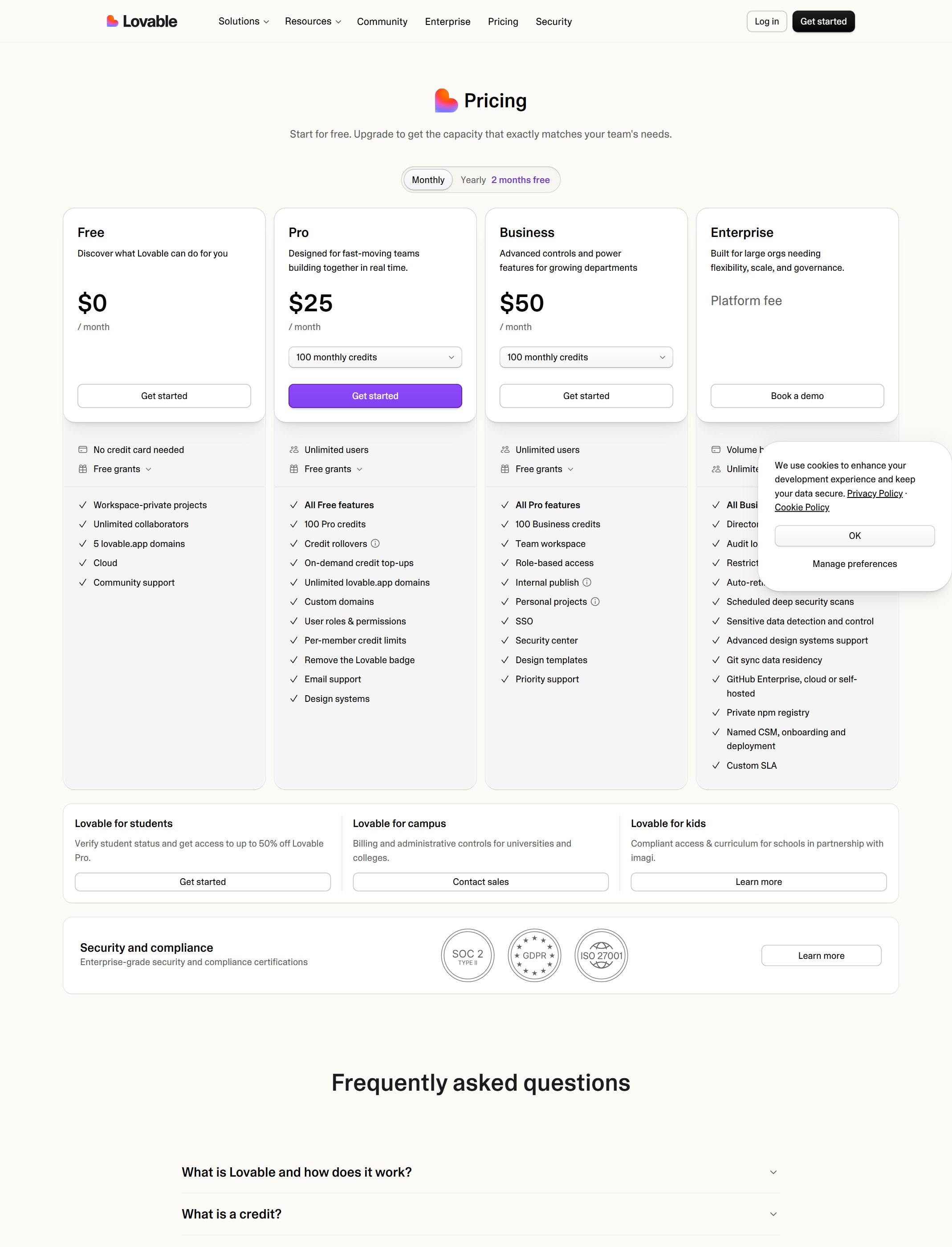
Move up when the free daily credits run out too fast and you are building or iterating most days. Compare tiers on the pricing page.

Team and enterprise plans for shared work

Higher tiers add collaboration, more credits, and admin controls such as enforced security scans. Pick these when a team ships together or needs compliance features.

Watchouts

  • Do not treat a working preview as production-ready. Review the generated code and database rules before real users arrive.
  • Published Lovable apps have leaked user data through missing access-control rules, so run the security scan and check every table before launch.
  • Keep API keys and secrets out of the chat and code, and use the secrets tool instead.
  • Building and running apps uses credits, so check plan limits before long sessions or leaving apps live.

Best for

  • Shipping a working MVP or internal tool without local setup
  • Non-technical founders who want a live app from a description
  • Landing pages and focused SaaS prototypes

Not for

  • Apps handling sensitive data or payments without an independent security review
  • Large production systems with strict compliance or infrastructure needs

How to use it well

Describe the smallest useful version first, connect Supabase early if you need a database or login, and run the pre-publish security scan plus a human code review before you share the app.

Pricing note

Free plan available. Paid plans are listed on Lovable's official pricing page.

We link to Lovable pricing instead of copying every price into this page. That is safer because AI tool pricing, usage limits, and plan names change often.

How to decide

Choose this if you want to describe an app in plain English and get a live full-stack version without writing code yourself.

Building and running apps uses credits, so check plan limits before long build sessions or leaving apps live.

Related tools

Compare Lovable with other tools in nearby categories.

OpenAI

ChatGPT

Free plan

A general AI assistant for writing, research, planning, data analysis, coding help, and everyday work.

Anthropic

Claude

Free plan

A conversational AI assistant often used for long documents, careful writing, coding help, and structured reasoning.

Google

Gemini

Free plan

Google's AI assistant for search-style help, writing, productivity, image work, and Workspace-related tasks.